%%{init: {'securityLevel': 'loose', 'flowchart': {'diagramPadding': 24}, 'themeCSS': 'foreignObject{overflow:visible}span.bot{display:flex;justify-content:flex-start;align-items:flex-start;width:100%;height:0;overflow:visible;line-height:0}span.bot img{display:block!important;width:18px!important;height:18px!important;padding:2px;background:#fff;border-radius:50%;box-shadow:0 0 0 1px #999}span.bot.r img{margin:0;transform:translate(-24px,-24px)}span.bot.d{justify-content:center}span.bot.d img{margin-top:-50%;transform:translateY(-24px)}'}}%%
flowchart TD
START(["START"]) --> agent{"<span class='bot d'><img src='data:image/svg+xml;base64,PHN2ZyB4bWxucz0iaHR0cDovL3d3dy53My5vcmcvMjAwMC9zdmciIHdpZHRoPSIyNCIgaGVpZ2h0PSIyNCIgdmlld0JveD0iMCAwIDI0IDI0IiBmaWxsPSJub25lIiBzdHJva2U9IiMzMzMiIHN0cm9rZS13aWR0aD0iMiIgc3Ryb2tlLWxpbmVjYXA9InJvdW5kIiBzdHJva2UtbGluZWpvaW49InJvdW5kIj48cGF0aCBkPSJNMTIgOFY0SDgiLz48cmVjdCB3aWR0aD0iMTYiIGhlaWdodD0iMTIiIHg9IjQiIHk9IjgiIHJ4PSIyIi8+PHBhdGggZD0iTTIgMTRoMiIvPjxwYXRoIGQ9Ik0yMCAxNGgyIi8+PHBhdGggZD0iTTE1IDEzdjIiLz48cGF0aCBkPSJNOSAxM3YyIi8+PC9zdmc+'/></span>agent"}
agent -.->|search| search_docs("search_docs")
agent -.->|web| web_search("web_search")
agent -.->|generate| generate("<span class='bot r'><img src='data:image/svg+xml;base64,PHN2ZyB4bWxucz0iaHR0cDovL3d3dy53My5vcmcvMjAwMC9zdmciIHdpZHRoPSIyNCIgaGVpZ2h0PSIyNCIgdmlld0JveD0iMCAwIDI0IDI0IiBmaWxsPSJub25lIiBzdHJva2U9IiMzMzMiIHN0cm9rZS13aWR0aD0iMiIgc3Ryb2tlLWxpbmVjYXA9InJvdW5kIiBzdHJva2UtbGluZWpvaW49InJvdW5kIj48cGF0aCBkPSJNMTIgOFY0SDgiLz48cmVjdCB3aWR0aD0iMTYiIGhlaWdodD0iMTIiIHg9IjQiIHk9IjgiIHJ4PSIyIi8+PHBhdGggZD0iTTIgMTRoMiIvPjxwYXRoIGQ9Ik0yMCAxNGgyIi8+PHBhdGggZD0iTTE1IDEzdjIiLz48cGF0aCBkPSJNOSAxM3YyIi8+PC9zdmc+'/></span>generate")
search_docs --> agent
web_search --> agent
generate --> END(["END"])
24 Observability
A request that used to take a second takes eight. You have the question, you have the answer, and invoke gave you nothing in between: a final value and no account of how it got there. Was it the model? The retriever? Did the agent loop three times instead of once? Chapter 21 made the graph catch its errors and Chapter 22 answered it over HTTP; neither made a run legible, and you cannot fix what you cannot see.
In production the usual answer is a hosted tracer — LangSmith is the LangGraph-native one — that watches every step and draws you a picture of the run. This chapter does not call LangSmith. We build the smallest tracer that could possibly work, in about a dozen lines, and then spend most of the chapter reading what it draws, because the principle is the same whether the observer is forty lines of Python or a cloud platform.
Instrument each node from the outside, collect the records into a trace, and read the trace back as a waterfall. The graph and the nodes never change; the observer sits beside them.
You have met from the outside before: streaming (Chapter 18) was the same move, a choice the caller made around a node that knew nothing about it.
24.1 What we’re building
We need a graph with enough happening to be worth watching, so we reuse the one from Chapter 6: the agent loop that routes to search_docs, then web_search, then finally generate, looping back through agent each time. It runs six node-steps, three of them repeats of agent, which is the kind of shape where “what actually ran, and in what order?” is a real question.
Every node body is a stub that time.sleeps for a fixed span to fake real work — the agent thinks fast, retrieval is slower, a web search is slowest. There is no model and no network here; the sleeps stand in for them so the waterfall has something with shape to draw. Swap the sleeps for a real llm.invoke and a real vector search and the tracer above them does not change a line.
24.2 The tracer: a logbook and a decorator
The entire tracer is two things: a list to write records into, and a decorator that does the writing. The list, and a clock that reads zero when the program starts so that every timestamp is an offset on one timeline:
import functools
import time

TRACE = []   # one logbook, one process, one run at a time

# perf_counter is monotonic; subtracting _T0 makes every stamp "ms since start"
_T0 = time.perf_counter()
WarningA module-level list is a single-run toy
TRACE is global, so every node in the process appends to the same list. That is what makes this chapter readable and what makes it wrong the moment two runs overlap — serve this graph from Chapter 22 and two concurrent requests interleave their steps into one waterfall with no way to tell them apart. The fix is not subtle (key the records by thread_id, or hand each run its own collector through Section 14.8) and it is not the point here. Knowing which simplification you are standing on is.
The decorator splices a “record this” step in front of and behind a node without reaching inside the node’s logic:
def traced(fn):
    """Wrap a node so it records its own start, duration, and output keys."""
    @functools.wraps(fn)               # keep fn.__name__ so the record is labeled right
    def wrapper(state):
        start = time.perf_counter()
        result = error = None
        try:
            result = fn(state)
1            return result
        except BaseException as exc:
            error = f"{type(exc).__name__}: {exc}"
2            raise
3        finally:
            TRACE.append({
                "node": fn.__name__,
                "thread_id": _thread_id(),
                "start_ms": (start - _T0) * 1000,
                "dur_ms": (time.perf_counter() - start) * 1000,
4                "output_keys": list(result.keys()) if result else [],
                "error": error,
            })
return wrapper- 1
-
resultgoes back unchanged. The node never learns it is being watched: it takes the samestate, returns the samedict, and its output flows on to the runtime as before. - 2
-
The record must not swallow the failure. An
exceptthat logs and returns would leave the graph believing the node succeeded, and the run would carry on over a state nobody wrote. So the exception is noted and re-raised, untouched; the graph’s own error handling (Chapter 21) fires exactly as it would without a tracer. - 3
-
finally, so a step that raised is still a step that happened. The first version of this wrapper appended afterfn(state)returned — which means the one step you most want to see, the one that blew up, was the only step missing from the trace. Losing visibility at the moment of failure is not a small gap in an observability tool; it is the gap. - 4
-
The one field a plain timer would miss. A node’s only mark on
Stateis thedictit returns, so this is a record of what each step changed; later in the chapter it is the column that tells the threeagentvisits apart from the nodes that did the work.
wrapper brackets the call in two perf_counter() reads and appends one dict to TRACE; that is the entire tracer. A failed node records output_keys: [] and an error string, because it produced no delta — the record says what happened rather than guessing.
- Every record carries the
thread_idthe run was invoked under._thread_id()is four lines:get_config()["configurable"].get("thread_id"), which works inside any node, wrapped so that a node called outside a run — a test driving it directly — recordsNoneinstead of failing over a missing id. That is therunIdChapter 22 hands out, and it is what makes a trace a trace rather than a pile of timings: the records of one run can be pulled out of a log that holds a thousand, and a span that cannot be keyed to its run proves nothing about it.
24.3 The graph stays ordinary
The nodes are the Chapter 6 loop, each carrying a @traced and a different sleep. @traced is the only new thing on them; no timing code, no logging, no TRACE reference lives inside a node body:
from typing import TypedDict

from langgraph.graph import END, START, StateGraph


class State(TypedDict):
    question: str
    route: str
    docs: list
    web_results: list
    iterations: int
    answer: str


@traced
def agent_node(state: State) -> dict:
    time.sleep(0.05)
    docs = state.get("docs", [])
    web = state.get("web_results", [])
    route = "search" if not docs else ("web" if not web else "generate")
    return {"route": route, "iterations": state.get("iterations", 0) + 1}


@traced
def search_docs_node(state: State) -> dict:
    time.sleep(0.30)
    return {"docs": ["doc-1", "doc-2"]}


@traced
def web_search_node(state: State) -> dict:
    time.sleep(0.50)
    return {"web_results": ["page-A"]}


@traced
def generate_node(state: State) -> dict:
    time.sleep(0.40)
    return {"answer": "the final answer"}


def route_after_agent(state: State) -> str:
    return state["route"]
The wiring is the plain conditional loop from Chapter 6. There is not a word about tracing in it, because tracing was applied one layer up, on the node functions themselves:
builder = StateGraph(State)
builder.add_node("agent", agent_node)
builder.add_node("search_docs", search_docs_node)
builder.add_node("web_search", web_search_node)
builder.add_node("generate", generate_node)

builder.add_edge(START, "agent")
builder.add_conditional_edges(
    "agent", route_after_agent,
    {"search": "search_docs", "web": "web_search", "generate": "generate"},
)
builder.add_edge("search_docs", "agent")
builder.add_edge("web_search", "agent")
builder.add_edge("generate", END)

graph = builder.compile()Compile it, invoke it once, and TRACE fills itself in: six records, in execution order, without a call to the tracer anywhere in the graph.
24.4 Drawing the waterfall
A list of six dicts is a trace, but nobody reads a trace as raw dicts. Each record becomes a horizontal bar, indented to where it started and as long as it ran, so overlaps and gaps and the one fat bar show at a glance. That picture is a waterfall, the same view LangSmith, Jaeger, and every APM tool put on screen; ours prints it with #.
def print_waterfall():
    print("\n" + "=" * 70)
    print("TRACE waterfall (each node: when it started, how long it ran)")
    print("=" * 70)
    total = max(t["start_ms"] + t["dur_ms"] for t in TRACE)
1    scale = 40 / total

    for i, t in enumerate(TRACE):
        indent = int(t["start_ms"] * scale)
        barlen = max(1, int(t["dur_ms"] * scale))    # never zero, or a fast node vanishes
        bar = " " * indent + "#" * barlen
        print(
            f"{i:>2} {t['node']:<16} {bar}  "
            f"{t['dur_ms']:>6.1f}ms  wrote {t['output_keys']}"
        )

    print("-" * 70)
    print(f"Total: {total:.1f}ms")
2    slowest = max(TRACE, key=lambda t: t["dur_ms"])
    print(
        f"Slowest node: {slowest['node']} ({slowest['dur_ms']:.1f}ms) "
        f"<- optimize this one first"
)- 1
- Milliseconds become columns, so the run fits on a terminal regardless of how long it took; a bar’s length is its share of the whole run, which is what your eye should compare.
- 2
- Names the slowest node so you do not squint at six bars deciding which looks longest.
The driver runs the graph, then draws what it recorded:
if __name__ == "__main__":
    print("Running the graph (every node is recorded automatically by @traced)...")
    graph.invoke({"question": "How do I configure Kafka?"},
                 config={"configurable": {"thread_id": "run-1"}})
    print_waterfall()
24.5 Running it
The runnable file, code/ch22_observability.py, wraps every node in @traced, invokes the graph once, and prints the waterfall it recorded:
Running the graph (every node is recorded automatically by @traced)...

======================================================================
TRACE waterfall (each node: when it started, how long it ran)
======================================================================
 0 agent_node       #    60.0ms  wrote ['route', 'iterations']
 1 search_docs_node   ########   310.0ms  wrote ['docs']
 2 agent_node                 #    60.0ms  wrote ['route', 'iterations']
 3 web_search_node              ##############   508.0ms  wrote ['web_results']
 4 agent_node                                 #    51.2ms  wrote ['route', 'iterations']
 5 generate_node                                ###########   407.6ms  wrote ['answer']
----------------------------------------------------------------------
Total: 1410.0ms
Slowest node: web_search_node (508.0ms) <- optimize this one first
Seeing this waterfall, what can you conclude? More than the last line says.
The bars staircase: every bar begins where the previous one ended, and none overlap. That is the signature of a graph with no parallelism. If search_docs and web_search had been fanned out with Send (Chapter 10), rows 1 and 3 would start at the same column and sit one above the other, and the total would drop by the shorter of the two. A waterfall tells you whether the concurrency you think you designed is the concurrency you got.
The loop is visible without reading any code: agent_node at rows 0, 2, and 4, a one-column blip each time, with a fat bar between visits. Count the agent rows and you have the iteration count; the iterations key in output_keys is the same number from the inside. If a run ever shows agent at rows 0, 2, 4, 6, 8 the loop is not converging, and you will see it here long before recursion_limit tells you.
The output_keys column says what each visit did. agent writes route and iterations every time and never content; the content lands one key per row, docs, then web_results, then answer. If generate ever showed up twice, or docs were written by a node other than search_docs, the column would show it.
The numbers carry information the sleeps did not put there. agent sleeps 50ms, yet its three rows read 60.0, 60.0, and 51.2. The extra is the operating system waking the thread late. The six durations also fall a little short of the total, and that residual is two things, not one: a head start — _T0 is read when the module loads, so building and compiling the graph sits inside total but outside every bar — plus the five true gaps between supersteps, about a millisecond each, where the runtime reads a node’s return and schedules the next. It is the second number you care about: on a graph with a checkpointer writing to Postgres after every step, those gaps are where the checkpoint cost shows, and this is the view that would catch it. Move _T0 down beside the invoke call if you want to isolate them.
What you cannot conclude is why web_search took half a second. The tracer sees node boundaries and nothing inside them; a network round trip, a slow parser, and a retry loop all look like one bar. That is the line between this tracer and a product one, and the Deep Dive below is about that line.
Note
The millisecond numbers above are one representative run; the sleeps are fixed but the OS adds jitter, so timings drift from machine to machine and run to run. What is stable is the structure: the same six records in the same order, the same output_keys on each, and the same slowest node, web_search, the only step that sleeps a full half-second.
24.6 Callbacks see inside a node
@traced is the right mental model — observation is a side channel, spliced around a node without the node knowing — and it is the wrong layer. The difference shows up the moment a node does more than one thing.
A decorator wraps the function you wrote. Inside that function a model gets called and a tool runs, and both arrive at the wrapper as a single duration. The wrapper can time the node; it cannot see what the node spent that time on — how much was the model, how much the tool.
LangChain’s callback system hooks the layer underneath. A BaseCallbackHandler is a bundle of methods (on_chain_start, on_chain_end, on_llm_start, on_tool_start, on_chain_error) that the runtime calls for you as it runs: you never invoke them yourself, you hand the handler to a run with config={"callbacks": [tracer]} and the runtime fires each one the moment the thing it names happens. Every model call and tool call arrives as its own event, tagged with the node it fired inside, so a handler can at least see the breakdown the decorator flattens into a single number: which calls fired inside the node, and in what order. Timing each of them is one step further — pair every on_llm_start with its on_llm_end by run_id, keep the parent — and the handler in this chapter stops short of it; it records the node’s duration and lists the calls inside. Section 24.7 is where the per-call durations, tokens and parents arrive without you writing that pairing.
Retries sit at yet another layer, and are easy to misplace. A node’s RetryPolicy re-runs the whole node, so a retried node is not one long duration hiding N attempts — it is N fresh node executions, and both the decorator and the callback see each one (@traced fires N times; on_chain_start fires N times). There is no single “retry” event to catch: in LangGraph 1.2.16 a node RetryPolicy does not call BaseCallbackHandler.on_retry, and neither does a Runnable’s own .with_retry() — on langchain-core 1.6.9 three attempts arrive as three on_chain_starts (four, counting the wrapper) and two on_chain_errors, and no on_retry. The hook exists for an integration that chooses to send it; nothing in this book’s stack does. And a retry inside the model client (the SDK’s own backoff) is below all of this and invisible to both. To count a node’s attempts, read the runtime’s attempt number or count the repeated node spans — a zero in an on_retry tally does not mean nothing was retried.
Subclassing it is ordinary Python — you override the events you care about and ignore the rest — but two details are not guessable, and both are in these few lines:
from langchain_core.callbacks import BaseCallbackHandler


class GraphTracer(BaseCallbackHandler):
    def __init__(self):
        self.steps: list[dict] = []
        self._start: dict = {}

    def on_chain_start(self, serialized, inputs, **kwargs):
1        if self._is_node(kwargs):
2            node = (kwargs.get("metadata") or {}).get("langgraph_node")
3            thread = (kwargs.get("metadata") or {}).get("thread_id")
            self._start[kwargs.get("run_id")] = (node, thread, time.perf_counter())

    def on_chain_end(self, outputs, **kwargs):
        got = self._start.pop(kwargs.get("run_id"), None)
        if got:
            node, thread, start = got
            self.steps.append({"node": node, "thread_id": thread,
                               "dur_ms": (time.perf_counter() - start) * 1000})

    @staticmethod
    def _is_node(kwargs) -> bool:
return any(t.startswith("graph:step:") for t in (kwargs.get("tags") or []))- 1
-
Not every chain event is a node. This chapter’s six-visit run fires ten
on_chain_startcalls: the six node steps, one for the graph itself, and three forroute_after_agent— a conditional edge is a runnable too, and the callback layer wraps it. Worse, each router event arrives tagged with the metadata of the node it routes out of, so unfiltered,agentappears six times instead of three. Filtering on thegraph:step:tag gives back exactly the six the decorator recorded. Skip the filter and the one node with a conditional edge silently counts double — the failure mode of a tracer nobody checks against a known-good one. (That extra router span is not noise; Section 24.7 shows it is a step the node-only decorator never saw at all.) - 2
-
The node’s name is not in
serialized.serialized.get("name")comes back empty for every event; the name lives inmetadata["langgraph_node"], next tolanggraph_step. Pairing start with end goes throughrun_id, because nothing guarantees the events nest. - 3
-
The run’s own id is in
metadatatoo. Thethread_idthe graph was invoked under arrives on every node event asmetadata["thread_id"], so the callback tracer keys its records by run exactly as the decorator did withget_config()— the samerunIdChapter 22 issues, read from the other side of the seam.
For the rest — the same run proving it records the node steps the decorator does, then listing the model and tool calls inside a node that the decorator collapses into one duration — see the companion code/ch22_callback_tracer.py.
24.7 LangSmith: the tracer you don’t write
This section is the one place in the book that needs an account and a network connection: a LangSmith key from smith.langchain.com.
Everything the last section reached for by hand, a hosted tracer gives you by flipping a switch — because it plugs into the same callback layer. LangSmith’s tracer is a LangChainTracer, and a LangChainTracer is a BaseCallbackHandler: the exact hook the callback tracer subclassed (Section 24.6).
classDiagram
    class BaseCallbackHandler {
        on_chain_start()
        on_llm_start()
        on_tool_start()
        on_retry()
    }
    class GraphTracer {
        <<hand-written>>
    }
    class LangChainTracer {
        <<LangSmith>>
    }
    BaseCallbackHandler <|-- GraphTracer
    BaseCallbackHandler <|-- BaseTracer
    BaseTracer <|-- LangChainTracer
Your GraphTracer and LangSmith’s LangChainTracer are two descendants of the one base — the same on_chain_start / on_llm_start / on_tool_start / on_retry hooks, one hand-written, the other hosted. What changes is that you do not write it, register it, or store what it emits. You set three environment variables:
export LANGSMITH_TRACING=true       # the older name still works: LANGCHAIN_TRACING_V2=true
export LANGSMITH_API_KEY=lsv2_...   # from smith.langchain.com
export LANGSMITH_PROJECT=doc-bot    # optional: the project runs are grouped under
No import, no decorator, no line added to the graph. On the next graph.invoke, LangChain sees tracing is on, attaches a LangChainTracer to the run through its callback manager, and streams every node — and, inside each node, every model, retriever, and tool call — to LangSmith as a nested span. The graph from earlier in this chapter is now traced without a character changed.
What lands there is a superset of what @traced kept. Your decorator recorded a node, a duration, and the written keys. Each LangSmith span carries the prompt and completion text, token counts and cost, inputs and outputs, and the exception if one fired — the fields the callback tracer could reach, now captured and drawn as a searchable waterfall that outlives the process and spans thousands of runs instead of one list that dies at exit.
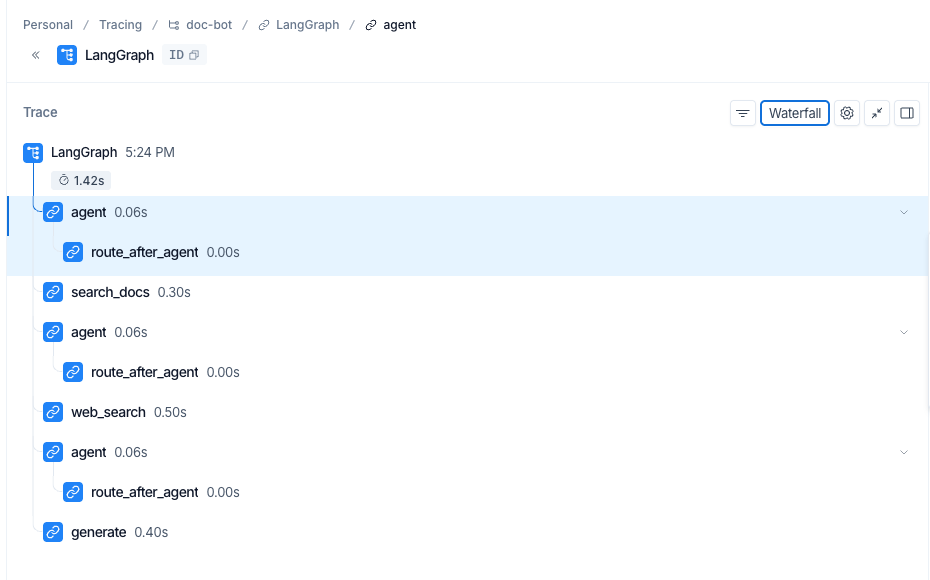
@traced account was six flat rows; here the steps hang under one root LangGraph span — and route_after_agent, the conditional edge, is a span in its own right, because the callback layer wraps the router and the node-only decorator never saw it.
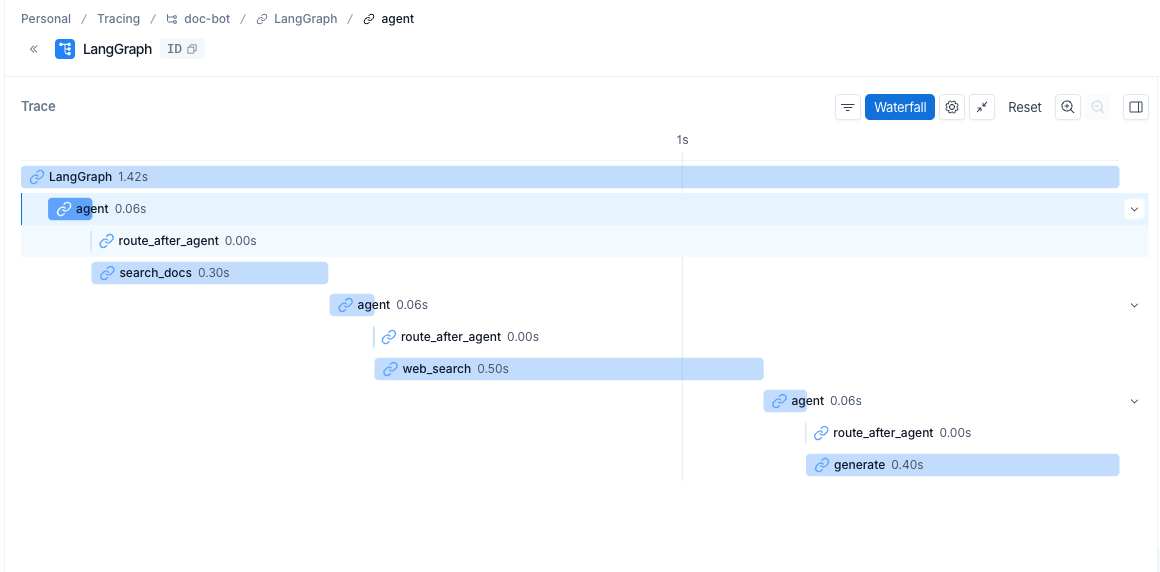
web_search (0.50s) is the fattest bar, the very node the hand-written trace named slowest.
The waterfall is not a coincidence of names; it is the same view: rows placed by start, sized by duration, read fattest-bar-first. What differs is everything around the bars. LangSmith nests: the steps hang under a root span instead of lying in a flat list, so parent and child are visible. And it sees more of the run, catching the route_after_agent router span that the node-only @traced missed entirely. These particular nodes are stubs, so there are no model spans to open; on a graph whose nodes call a model, each call nests inside its node as its own bar (Section 24.6) — the breakdown the flat list could never show.
Hand-written @traced |
LangSmith | |
|---|---|---|
| Turned on by | a ~20-line decorator on each node | three environment variables, no code |
| Reaches | the node boundary — one duration per node | the whole tree: nodes, and every model / tool / retriever call inside them |
| Per record | node, duration, written keys | the above, plus prompts, completions, tokens, cost, I/O, errors |
| Lives in | an in-memory list, gone at process exit | a remote, searchable UI, kept across runs |
| Run data | never leaves your process | prompts and answers sent to a cloud service |
The last row is the trade. @traced is twenty lines running wholly inside your process: no account, no key, and nothing about a run ever leaves the machine — for a bot answering over internal documents, not a small property. LangSmith is zero lines, but the prompts and answers of every traced run go to a cloud you do not own. When that is the wrong trade it was never lock-in: because the observer is the callback layer, the same spans export to a self-hosted LangSmith, or — once LangSmith’s OpenTelemetry support is on and its exporter points at another OTLP endpoint — to Jaeger, Grafana Tempo, or Honeycomb, without a node knowing.1
One gap the environment variables do not close: a plain Python helper that is not a LangChain runnable emits no callbacks, so it never shows up in the trace. LangSmith’s @traceable decorator wraps such a function into the same span tree. Your graph’s nodes are runnables already and need none of it — reach for @traceable only when a helper of your own should appear as a span beside them.
NoteDeep Dive: how the tracer attaches, and where token counts come from
Why no code is needed. The switch is read per run, inside LangChain’s own machinery. Every graph.invoke builds a callback manager for the run, and building it calls _configure() (in langchain_core/callbacks/manager.py), which checks the environment and, if tracing is on, constructs a LangChainTracer and adds it to that run’s handlers:
graph.invoke()
  └─ build CallbackManager → _configure()
        └─ read env: is tracing on?
              └─ yes → LangChainTracer() attached to this run's handlers
It is the same config={"callbacks": [...]} seam you filled by hand in Section 24.6, populated for you from the environment. Nothing in the graph changes because the attach point was never in the graph.
Why it does not need @traced. The tracer records nothing by reading your decorator; it subscribes to the events LangGraph fires as it runs — on_chain_start for each node, on_llm_start for each model call — each tagged by the runtime with langgraph_node. Delete every @traced and the LangSmith trace is identical; the proof is that it captured the route_after_agent router span, which @traced (nodes only) never wrapped.
Getting token counts. The tracer does not count tokens — it copies them off the model’s reply. A finished model call carries usage_metadata (input_tokens, output_tokens, total_tokens), delivered to on_llm_end, and LangSmith shows it per call and rolled up per trace. For the synchronous server that is automatic: llm.invoke returns the usage the endpoint reports (the local server included), so the counts appear with nothing added. Streaming is the exception — a streamed reply drops the usage summary, and the span shows no tokens — unless you ask for it:
llm = ChatOpenAI(base_url=..., model=..., stream_usage=True) # -> stream_options={"include_usage": true}With stream_usage=True the provider emits a final usage chunk, usage_metadata is populated again, and the streamed run gets its token counts back. (All of this assumes the model reports usage at all; a server that never returns a usage block leaves the field empty whichever path you take.)
Run code/ch22_langsmith.py — its generate node makes one real, non-streamed model call — with tracing on, and the counts come back rolled up to the run, nothing of ours added:
Token usage, straight from LangSmith (no counting code of ours):
  prompt     : 71
  completion : 20
  total      : 91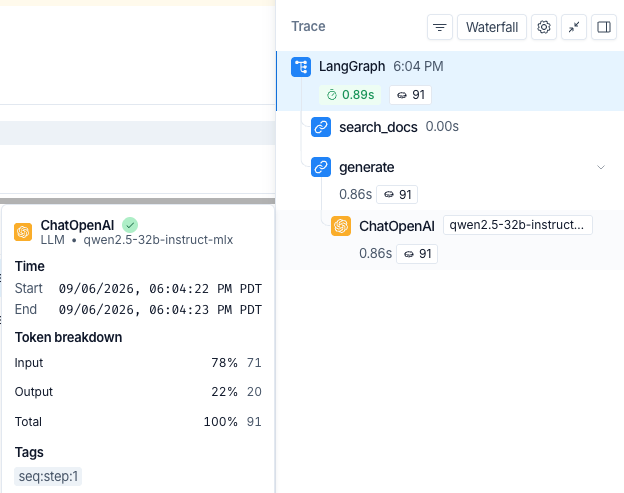
generate node’s ChatOpenAI span — 71 in, 20 out — and rolls the total up to the root LangGraph span. search_docs is a stub with no model call, so it bills nothing.
24.8 The operational rule
When a production run misbehaves, the first thing to read is the waterfall, and the questions to ask of it are the ones this chapter asked: do the bars overlap where the design says they should, how many times does the loop node appear, which node wrote the key that looks wrong, and how much of the total is gaps rather than bars. One max() over durations names the slowest span, which is a candidate, not a verdict: the other readings — how often it ran, and how much of the wall clock it holds — say whether optimizing it is even the right move. Whatever tracer you adopt, LangSmith or OpenTelemetry, is this decorator with automatic instrumentation, richer spans, and remote storage; it can be swapped out because it was never inside a node.
The graph can now be watched: you can stand outside a run and see who did what, when, and how slowly. What it still cannot do is reach outside its own process for capability. Every tool it has called so far — back to Chapter 7 — has been an in-process Python function. The next chapter opens that boundary: Chapter 25 connects the graph to external tools over the Model Context Protocol (MCP), so the doc-bot can call services that live in another process, or another machine, without your graph having to import them.
New pieces in this chapter
| Piece | Usage |
|---|---|
| Type | |
BaseCallbackHandler |
The base class LangChain calls as a run executes — on_chain_start/on_chain_end, on_llm_start, on_tool_start, on_chain_error, each tagged with langgraph_node. Subclass it to watch the runtime from beneath a node (Section 24.6). A node RetryPolicy fires no on_retry here (1.2.16); a retried node reappears as a repeated on_chain_start. LangSmith’s own LangChainTracer is one, which is why turning tracing on takes no code (Section 24.7) |
| API | |
@functools.wraps |
Put on a wrapper to stamp the wrapped function’s __name__ and docstring onto it, so a decorated node still introspects as itself rather than as wrapper. Standard decorator hygiene; traced uses it |
stream_usage |
A ChatOpenAI flag for token accounting. A streamed reply drops the usage summary, so its span shows no tokens; ChatOpenAI(…, stream_usage=True) sends stream_options={"include_usage": true}, the provider emits a final usage chunk, and usage_metadata is filled again. Plain invoke already returns usage, so this is a streaming-only concern (Section 24.7) |
Code in this chapter
| File | What it runs |
|---|---|
code/ch22_observability.py |
A tracer of your own: a decorator that records who ran, when, for how long, and what it produced. |
code/ch22_callback_tracer.py |
The runtime’s own hook, one layer below the decorator, and the steps the decorator cannot see. |
code/ch22_langsmith.py |
The same run through LangSmith, which reports token usage on its own once streaming is told to ask for it. |
Challenge
The tracer as written watches happy paths and node boundaries. These three challenges push it past both: first to summarize what it already records, then to survive the one thing every production tracer must survive — a node that throws — and finally to point it at a graph whose durations nobody chose in advance. The waterfall’s shape is yours to design; each challenge ships a worked solution to compare against.
🥉 Bronze — bill the loop
The waterfall lists agent_node three separate times, and each visit looks cheap. But a cheap node visited often is a classic hidden cost. Add a rollup to print_waterfall() that groups TRACE by node name and prints the total time spent in each node across the whole run, sorted slowest-first. Predict before you run it: summed over its three visits, does agent still rank last?
Whichever way you guessed, the number that teaches is the next one: at how many visits would it stop ranking last? Work it out from your own rollup — the per-visit averages are all you need — and notice that the waterfall would draw that run as a row of thin slivers nobody reads. Then write down why “slowest single step” (what the current tracer reports) and “most time spent overall” can name different nodes, and which one you would trust when deciding what to optimize.
 Worked solution with tests:
 code/answers/ch22_bill_the_loop.py.
🥈 Silver — break the tracer two ways, and watch what each one costs
wrapper records failures in a finally and re-raises. Both halves are load-bearing, and the way to believe that is to remove them one at a time.
First, move the TRACE.append(...) out of the finally and back to just after fn(state). Arm one node to raise, run it, and read the waterfall: predict before you look which steps survive and which one is missing. Then put it back.
Second — the more dangerous one — restore the finally but change raise to return {}. Now the tracer records the crash and the graph never hears about it. Run it and write down what the waterfall says versus what actually happened to the run: you should get a full, tidy, entirely misleading trace of a graph that carried on over a state no node ever wrote.
Then a second move, back to the Gotcha: your tracer watched the crash in full detail. Explain why that still does not let you resume from it, and which chapter’s tool would.
Hints: the second break is the one that ships. It looks like defensive programming — the node “handled” its error — and the only thing that would have caught it is the graph behaving differently downstream, which is precisely what an observability tool is supposed to tell you about.
Worked solution with tests: code/answers/ch22_trace_the_failure.py.
🥇 Gold — run it for real, and see which bar is fattest
Every duration in this chapter was picked by hand: web_search is the widest bar because its stub sleeps half a second, and it sleeps half a second because that is what a web search feels like. Useful for learning to read a waterfall — and the chapter’s advice is to optimize the fattest bar, on a graph where the author chose which bar is fattest.
So take the choosing away. Keep the tracer and the wiring exactly as they are, and replace the four stubs with the real thing: agent and generate call the model from Chapter 12, and search_docs queries the Chroma store from Section 27.2. Delete every time.sleep.
This one reaches forward: the Chroma store is built in Section 27.2, a later chapter. If you are reading in order, come back to this Gold once you have run ch25_rag_chroma.py once to populate the store; the worked solution skips itself cleanly until then.
Predict the ranking before you run it. Then run the same question three or four times and read the waterfalls side by side. Two things are worth writing down.
First, which node is widest now, and by how much — the gap between a model call and a local vector search is usually not subtle, and it is the reason production traces of agent systems look the way they do.
Second, how much the numbers move between identical runs. The stubs were fixed and the totals still wobbled by a few milliseconds; a real model wobbles by a great deal more, and the same token count can take noticeably longer on a cold model than a warm one. That instability is not noise to be averaged away and forgotten — it is the reason a single trace is an anecdote and a tracer worth having records every run.
The tracer itself should need no edits at all. If it does, the wrapper was doing something that only worked because the nodes were pretend.
Worked solution with tests: code/answers/ch22_real_waterfall.py.
LangSmith’s OpenTelemetry integration, including sending traces to an alternate provider: https://docs.langchain.com/langsmith/trace-with-opentelemetry. OTLP ingest at the other end: Jaeger https://www.jaegertracing.io/docs/latest/apis/, Honeycomb https://docs.honeycomb.io/send-data/opentelemetry, Grafana Tempo https://grafana.com/docs/tempo/latest/set-up-for-tracing/instrument-send/set-up-collector/otel-collector/.↩︎