flowchart LR
START(["START"]) --> plan["plan"]
plan --> docs["check_docs"]
plan --> web["search_web"]
docs --> generate["generate"]
web --> generate
generate --> END(["END"])
26 Inside Persistence
Every crash-and-resume in this book has rested on one thing the checkpointer does and we have never looked at: it knows exactly what a run had saved when it died, and what it had not — so resume keeps the saved work and redoes only the rest. This chapter opens that box.
It is a reading, not a build. We make the smallest graph that leaves a trail, run it once under a SqliteSaver, and open the database file it writes — two ordinary SQL tables, readable with any sqlite3 connection — with one question held throughout: why do some writes survive a crash and some don’t?
A checkpointer is not one store but two. A checkpoints table holds one snapshot per superstep; a writes table holds the pending outputs that turn one snapshot into the next. A write survives a crash if it was committed to either table before the process died; otherwise the task that would have produced it simply runs again.
We reach for a SqliteSaver rather than the InMemorySaver of Part I on purpose. A chapter called Inside Persistence should look at something that actually persists. The storage is two tables with named columns, so we can point a plain SELECT at the parts that matter — and because it is a file on disk, a later section can kill the process mid-run and watch a fresh one resume from it, the one thing an in-memory store can never show you.
26.1 The smallest graph that leaves a trail
We use a tiny doc-bot graph: plan, then two retrievals — check_docs and search_web — that run in parallel, then generate.
import operator
import sqlite3
from typing import Annotated, NotRequired, TypedDict

from langgraph.checkpoint.sqlite import SqliteSaver
from langgraph.graph import END, START, StateGraph


class State(TypedDict):
    question: str                              # input, set by the caller
    steps: Annotated[list[str], operator.add]  # each node appends its own name
    answer: NotRequired[str]                   # written by generate


def plan_node(state: State) -> dict:
    return {"steps": ["plan"]}


def check_docs_node(state: State) -> dict:
    return {"steps": ["check_docs"]}


def search_web_node(state: State) -> dict:
    return {"steps": ["search_web"]}


def generate_node(state: State) -> dict:
    return {"steps": ["generate"], "answer": "final answer"}
The one node that fans out — plan splitting to check_docs and search_web, which then join at generate — is deliberate, and it is the reason this chapter can show the writes table doing its job at all. Hold that thought until Section 26.4; for now it just means one superstep runs two nodes. The other detail the chapter depends on is the storage: instead of an in-memory saver, we point the graph at a SqliteSaver backed by a file on disk. compile(checkpointer=...) normally hides the store inside the graph, but its tables are just rows in that file, and we are about to open them with a second, ordinary sqlite3 connection — the way anyone with the file could.
builder = StateGraph(State)
builder.add_node("plan", plan_node)
builder.add_node("check_docs", check_docs_node)
builder.add_node("search_web", search_web_node)
builder.add_node("generate", generate_node)
builder.add_edge(START, "plan")
builder.add_edge("plan", "check_docs")     # plan fans out to both retrievals,
builder.add_edge("plan", "search_web")     # which run in one superstep
builder.add_edge("check_docs", "generate")
builder.add_edge("search_web", "generate")
builder.add_edge("generate", END)

conn = sqlite3.connect("ch23.db", check_same_thread=False)  # a real file on disk
saver = SqliteSaver(conn)   # keep a handle; we read its tables below
graph = builder.compile(checkpointer=saver)

THREAD = {"configurable": {"thread_id": "inspect-001"}}
One tiny run leaves a full trail behind it, and everything after this just reads that trail back. The runnable file code/ch24_inside_persistence.py builds the graph above, makes this single call, and prints the inspections that follow:
result = graph.invoke(
    {"question": "How do I configure Kafka?", "steps": []}, THREAD
)
print("run finished. final steps:", result["steps"])run finished. final steps: ['plan', 'check_docs', 'search_web', 'generate']Four nodes ran — check_docs and search_web in the same superstep — and steps accumulated their names, leaving a full trail in the saver. Before we read it back, it pays to ask what a checkpointer is even trying to do — the storage makes sense only once you have wanted to build it yourself.
26.2 Be the saver
Put yourself in the checkpointer’s place. A run advances in supersteps: each step, one or more nodes run — each such run is a task — and each returns a set of channel updates. (In a straight-line graph a task is just a node; a node that fans out becomes several.) Your one job is that if the process dies, the run resumes without redoing finished work or losing it. When do you write, and what?
The answer is two writes at different grains, and a checkpointer makes both — not one or the other:
| Checkpoint — snapshot at the boundary | Per-task write | |
|---|---|---|
| Written | after a whole superstep completes | the moment each task finishes |
| Holds | the whole state: every channel value, plus which nodes run next | one task’s output |
| Grain | coarse — one write per step | fine — one write per task |
| On a mid-step crash | nothing since the last boundary survived; the whole step re-runs | a task whose write already landed is saved; only tasks without one re-run |
That is the design, and it is two writes for two reasons. The checkpoint is your consistent point to resume from; the per-task records are the pending work since that point. A snapshot alone is consistent but coarse; per-task records alone are fine-grained but have nowhere consistent to start. Keep both. (A Postgres saver adds a third table purely for storage economy: it keeps each channel value once per version and lets the other two point at it, bookkeeping under the same two ideas.) Restoring is the mirror image: load the latest checkpoint, apply the task outputs recorded against it, and re-run only the tasks with no recorded output. That one rule is the answer to the chapter’s question: a task’s output is reused on recovery once its write has been committed to the store; it is lost — and the task re-runs — if the process dies in the window between the node returning and that write landing.
Two consequences follow:
- A resume can re-run a node that already ran, so side effects must be idempotent. A task whose write committed is skipped; one without a committed write re-runs from its first line — and “without a committed write” includes a node that returned an instant before the crash but never got its output to disk. So a node with a side effect (charge a card, send a mail) can run twice across a crash, and making that safe is yours (Chapter 21’s retry Gotcha, wearing a crash this time). How wide that window is depends on the run’s
durabilitymode (Chapter 8 —"sync","async", or"exit", passed toinvoke, not a property of the saver) and on how the process died, but it is never zero. - Every guarantee the book has called a feature is this one mechanism from a different angle: resume, time travel, human-in-the-loop. Build the saver once and you have built all of them.
26.3 Two tables: checkpoints and writes
A SqliteSaver keeps exactly two tables, checkpoints and writes. Application code never touches them directly: you read state through get_state() and get_state_history() (Section 8.4), and those methods are backed by exactly these two tables. We open them ourselves because how they are laid out is what this chapter is here to see — that layout is the reason some writes survive a crash and some do not. A different saver spells the same two differently (an InMemorySaver as heap dicts; a PostgresSaver peels a third table off for storage economy), but the two roles are the same.
One term runs through both: a channel is a single named slot of state. Every key in your State is a channel — question, steps, answer — plus a few the runtime keeps for its own control flow (you’ll meet branch:to:plan in the writes below).
checkpoints— one row per superstep snapshot.checkpoint_idandparent_checkpoint_id(each row’s link back to the one before it) are plain text, andmetadatais JSON —source,step,parents, readable with SQLite’s ownjson_extract. Onlycheckpoint, the packed channel values, is a genuinely opaque binary blob (msgpack1).writes— the per-task outputs that will advance a checkpoint to its successor. Each row carries thecheckpoint_idit was computed from, thetask_idof the node that produced it, and thechannelit wrote;valueis the other msgpack blob (ornullfor a routing write that carries no value).
That is the whole store — two tables, most of their columns plain text you can read with any sqlite3 client. The keys tie them together: every writes row repeats the (thread_id, checkpoint_ns, checkpoint_id) of the checkpoint it advances, so one checkpoint owns a handful of writes; and parent_checkpoint_id points each checkpoint at the one before it, stringing the whole run into a chain:
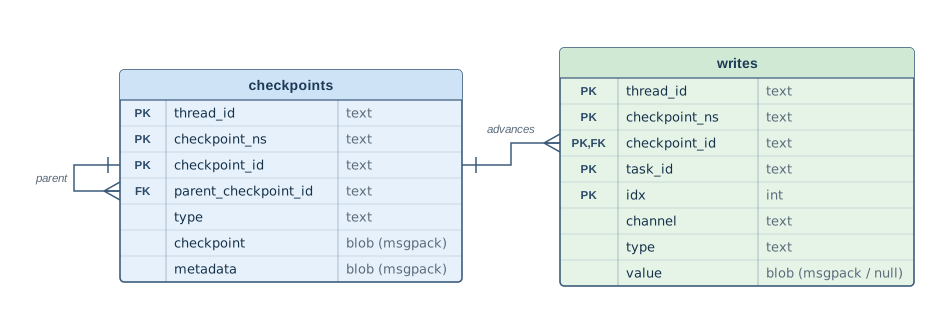
checkpoints is one-to-many with writes on the checkpoint key, and self-referential through parent_checkpoint_id. Your State channels are not columns — they are values inside the blobs.
The whole read is a handful of SELECTs — you could type them at a sqlite3 ch23.db prompt and never import LangGraph:
.tables                          -- checkpoints  writes

-- the checkpoint chain: parent_checkpoint_id links each row to the one before
SELECT checkpoint_id, parent_checkpoint_id
FROM   checkpoints ORDER BY checkpoint_id;

-- every task's writes; step 1 carries TWO tasks -- the fan-out siblings
SELECT checkpoint_id, task_id, channel, value
FROM   writes ORDER BY checkpoint_id;
The step number is not one of the opaque columns — it lives in the JSON metadata, so plain SQL lifts it out with json_extract, no LangGraph in the loop:
SELECT checkpoint_id,
       json_extract(CAST(metadata AS TEXT), '$.step') AS step
FROM   checkpoints ORDER BY checkpoint_id;
Below we let the saver hand us the step instead — saver.list() deserializes metadata into a dict, the handier public read over the same row. The genuinely opaque columns are checkpoint and each write’s value; those are the msgpack the serde exists to unpack:
def step_labels(saver: SqliteSaver) -> dict:
    # checkpoint_id -> step. metadata is JSON (the json_extract above reads it in
    # pure SQL); saver.list() is just the more convenient public read.
    return {t.checkpoint["id"]: t.metadata["step"] for t in saver.list(THREAD)}
Run the queries and it reads back like any sqlite3 session. The checkpoints carry their real UUIDv62 ids (each row’s parent_checkpoint_id is the id of the row above it, with a step label on the side). The writes are shown with checkpoint_id folded to its step and each value decoded from its blob. The run has five tasks in all — the four nodes plus the internal __start__ input task, labeled t1..t5 in order — and there the fan-out surfaces: step 1 holds two of them, t3 and t4, one per parallel retrieval (code/ch24_inside_persistence.py):
===== 1. Two real SQL tables: checkpoints and writes =====
sqlite> .tables
checkpoints  writes

columns:
  checkpoints: thread_id, checkpoint_ns, checkpoint_id, parent_checkpoint_id, type, checkpoint, metadata
  writes     : thread_id, checkpoint_ns, checkpoint_id, task_id, idx, channel, type, value

sqlite> SELECT checkpoint_id, parent_checkpoint_id FROM checkpoints ORDER BY checkpoint_id;
  [varies] the ids are UUIDv6, different every run; each parent = the row above
  checkpoint_id                         parent_checkpoint_id                  step
  ------------------------------------  ------------------------------------  ----
  1f1ab496-cf1e-6b82-bfff-8b8e135bd258                                          -1
  1f1ab496-cf23-6722-8000-79a5e2d5fd02  1f1ab496-cf1e-6b82-bfff-8b8e135bd258     0
  1f1ab496-cf24-66fe-8001-204c1326edfd  1f1ab496-cf23-6722-8000-79a5e2d5fd02     1
  1f1ab496-cf25-69f0-8002-8045e87c9513  1f1ab496-cf24-66fe-8001-204c1326edfd     2
  1f1ab496-cf26-6558-8003-f519adb8cfe2  1f1ab496-cf25-69f0-8002-8045e87c9513     3

sqlite> SELECT checkpoint_id, task_id, channel, value FROM writes;
        (checkpoint_id as its step; value decoded, '-' = a control write
         with no value; five tasks t1..t5 -- step 1 holds two, the fan-out)
  step  task  channel               value (the delta written)
  ----  ----  --------------------  -------------------------
    -1  t1    branch:to:plan        -
    -1  t1    question              'How do I configure Kafka?'
    -1  t1    steps                 []
     0  t2    branch:to:check_docs  -
     0  t2    branch:to:search_web  -
     0  t2    steps                 ['plan']
     1  t3    branch:to:generate    -
     1  t3    steps                 ['check_docs']
     1  t4    branch:to:generate    -
     1  t4    steps                 ['search_web']
     2  t5    answer                'final answer'
     2  t5    steps                 ['generate']
Two tables, and apart from the two msgpack blob columns (checkpoint and writes.value) every column is text or JSON you can read. Five rows in checkpoints, steps -1 through 3 — the step numbering Chapter 8 introduced: a pristine step -1 (before your input is folded in) and a step 0 that holds the input with plan still to run. The parent_checkpoint_id column is a linked list in the clear — step 3 points at step 2, step 2 at step 1, back to the pristine step -1, which points at nothing.
Twelve rows in writes, and this is where the fan-out earns its place. Each of the five tasks — the four nodes plus the internal __start__ input task, labeled t1..t5 in order — writes under the checkpoint it advances. Every step has exactly one task except step 1, which has two: t3 and t4, one for each parallel retrieval, each writing its own steps delta (['check_docs'], ['search_web']) and its own branch:to:generate mark. That is why the table is keyed by task_id: a single checkpoint can gather writes from several nodes at once. The decoded value column is each write’s delta, the increment the node returned; the steps reducer (operator.add) folds those deltas into the next checkpoint’s assembled list (Section 26.7 shows the whole list reassembled).
For the crash question this split is the first half of the answer: a node’s output lands in the writes table the moment that node finishes, and it is folded into a new checkpoint only when the whole superstep has. In a fan-out that gap is exactly where a crash can catch you — one sibling done, the other not — and Section 26.4 walks straight into it.
NoteDeep Dive: the same two tables, in memory and in Postgres
We are reading a SqliteSaver, but the two-table shape is not a SQLite detail — it is the checkpointer contract, and every saver keeps it. An InMemorySaver keeps the same two roles as plain Python dicts in the process’s heap — saver.storage for the checkpoints table and saver.writes for the writes table, plus a blobs dict that splits the values out just as Postgres does below — keyed the same way, and lost the moment the process exits. A PostgresSaver goes the other way and peels a third table off the checkpoint: checkpoints and checkpoint_writes match SQLite’s two, and checkpoint_blobs stores each channel value once per (thread_id, checkpoint_ns, channel, version) so a value that does not change is not copied into every snapshot (plus a checkpoint_migrations table it keeps for itself). One contract, three storage shapes.
26.4 A crash between the tables: node-level fault tolerance
Chapter 8 claimed that a resume re-runs one node, not the whole run. The writes table is the mechanism under that claim — but a straight line rarely lets you see it. The subtlety is that a node’s write and its superstep’s closing checkpoint are two separate commits even with one node per superstep, so a crash can land with the write on disk and the checkpoint not yet written. You just will not catch it by watching, because on a linear graph the window is a blink wide. Put two nodes in a superstep — a fan-out — and it opens up: one sibling’s output can sit on disk while the superstep it belongs to has not closed, long enough to observe. Fan-out does not create the gap; it widens the gap a linear graph already has. That gap is the whole reason the writes table is a separate store.
Picture our fan-out superstep. The runtime reads the step-1 checkpoint and schedules both check_docs and search_web. As each finishes, its output is written into the writes table, keyed to that step-1 checkpoint. Only once both are done does the runtime fold them into a step-2 checkpoint. So there is a window: check_docs finished and parked, search_web not yet — and no step-2 checkpoint at all.
Crash in that window — search_web raises while check_docs has already returned — and check_docs’s output is not lost. It reached the writes table, parked on the step-1 checkpoint; there is no later checkpoint that could have held it, because the superstep never completed.
On the graph, that crash falls between two frontiers: plan is safely checkpointed, check_docs’s write has landed, and search_web crashed short of it.
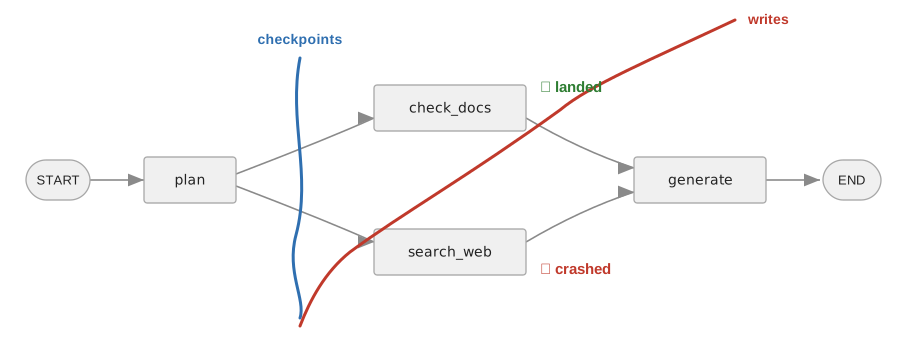
plan. The red writes frontier is a diagonal: it keeps check_docs on its near side — that write landed on disk — and leaves search_web beyond it, crashed. check_docs sits between the two frontiers: a write with no checkpoint to hold it.
We stage exactly that in a separate process, let the unhandled error take the whole process down, and let a fresh one resume from the file:
CRASH_THREAD = {"configurable": {"thread_id": "crash-001"}}   # its own thread


def search_web_boom(state):                 # search_web, rigged to crash
    raise RuntimeError("web search backend died mid-superstep")


def run_crash_child(crash_db):
    # build_graph(crash=True) swaps search_web -> search_web_boom; the rest is the
    # same fan-out graph. check_docs finishes and writes to the file; search_web
    # raises and takes the whole process down.
    with SqliteSaver.from_conn_string(crash_db) as saver:
        build_graph(saver, crash=True).invoke(
            {"question": "...", "steps": []}, CRASH_THREAD)


def dump_writes(crash_db, saver, label):   # the same SELECT, decoded, either side of resume
    # Print the STEP, never the checkpoint_id: the id is a uuid6 that changes every
    # run, and this table is meant to be compared against the one below it.
    step = step_labels(saver, CRASH_THREAD)
    n_ck = db_rows(crash_db, "SELECT count(*) FROM checkpoints")[0][0]
    rows = [(step[cid], task, channel, saver.serde.loads_typed((typ, val)))
            for cid, task, channel, typ, val in db_rows(crash_db,
                "SELECT checkpoint_id, task_id, channel, type, value FROM writes")]
    print(f"\n--- {label} (checkpoints: {n_ck}) ---")
    print(f"  {'step':>4}  {'task_id':<8}  {'channel':<20}  value")
    print(f"  {'----':>4}  {'-' * 8}  {'-' * 20}  -----")
    for s, task, channel, dec in sorted(rows, key=lambda r: (r[0], r[2], repr(r[3]))):
        print(f"  {s:>4}  {task[:8]:<8}  {channel:<20}  {'-' if dec is None else repr(dec)}")


def show_crash_and_resume(crash_db):
1    child = subprocess.run([sys.executable, __file__, "--crash-child", crash_db],
                           capture_output=True, text=True)
    print(f"child (check_docs finishes; search_web raises, then dies):"
          f" exit code {child.returncode}")

    with SqliteSaver.from_conn_string(crash_db) as saver:
        dump_writes(crash_db, saver, "after the crash")
3        seen = list(saver.get_tuple(CRASH_THREAD).checkpoint["versions_seen"])
2        out = build_graph(saver).invoke(None, CRASH_THREAD)
        dump_writes(crash_db, saver, "after resume")
    print(f"\nfinal steps: {out['steps']}")
print(f"versions_seen at the crash checkpoint: {seen} (stops at plan; neither sibling)")- 1
-
Run this same file again as a child process with
--crash-child. The child builds the graph withsearch_webrigged to raise and invokes it; the unhandled error propagates out ofinvokeand takes the whole child process down. By thenplanandcheck_docshave already committed their writes tocrash_db. (It is an unhandled exception, so the process still unwinds cleanly — this shows cross-process file durability, not aSIGKILLor power cut that could sever a write mid-commit.) - 2
-
invoke(None, ...)means “resume this thread from what is on disk,” not “start over.” The runtime loads the last checkpoint (step 1), replays the parked writes — socheck_docs’s output is applied without re-running it — and schedules the tasks that left no successful write: here justsearch_web, which raised. It reruns,generatejoins, the run completes. - 3
-
Read before the resume, not after. Neither sibling is in
versions_seen— the fan-out superstep never checkpointed — which is how you can tellcheck_docsis skipped by write replay rather than byversions_seen. Oneinvokelater the crash checkpoint is no longer the newest and this is gone.
===== 2. A real crash: the writes table before and after resume =====
child (check_docs finishes; search_web raises, then dies): exit code 1

sqlite> SELECT checkpoint_id, task_id, channel, value FROM writes ORDER BY checkpoint_id, channel;
  [varies] checkpoint_id shown as step; task_id abbreviated; value decoded ('-' = none)

--- after the crash (checkpoints: 3) ---
  step  task_id   channel               value
  ----  --------  --------------------  -----
    -1  a18150ce  branch:to:plan        -
    -1  a18150ce  question              'How do I configure Kafka?'
    -1  a18150ce  steps                 []
     0  3c3490ab  branch:to:check_docs  -
     0  3c3490ab  branch:to:search_web  -
     0  3c3490ab  steps                 ['plan']
     1  29229f75  __error__             "RuntimeError('web search backend died mid-superstep')"
     1  b0d3afcf  branch:to:generate    -
     1  b0d3afcf  steps                 ['check_docs']

--- after resume (checkpoints: 5) ---
  step  task_id   channel               value
  ----  --------  --------------------  -----
    -1  a18150ce  branch:to:plan        -
    -1  a18150ce  question              'How do I configure Kafka?'
    -1  a18150ce  steps                 []
     0  3c3490ab  branch:to:check_docs  -
     0  3c3490ab  branch:to:search_web  -
     0  3c3490ab  steps                 ['plan']
     1  29229f75  __error__             "RuntimeError('web search backend died mid-superstep')"
     1  b0d3afcf  branch:to:generate    -
     1  29229f75  branch:to:generate    -
     1  b0d3afcf  steps                 ['check_docs']
1 29229f75 steps ['search_web']
2 9096710a answer 'final answer'
2 9096710a steps ['generate']
final steps: ['plan', 'check_docs', 'search_web', 'generate']
versions_seen at the crash checkpoint: ['__input__', '__start__', 'plan'] (stops at plan; neither sibling)Read the two tables against each other. After the crash, three checkpoints, not five: the fan-out superstep never completed, so no step-2 checkpoint was written. But its writes are on disk — and step 1 carries two task_ids: one wrote a lone __error__ (that is search_web, which crashed; its value is the RuntimeError), the other wrote steps (['check_docs']) and branch:to:generate (that is check_docs, which finished). check_docs’s output survived with no checkpoint to hold it.
After resume, five checkpoints, and step 1 has grown. The __error__ is still there (resume does not erase it), but beside it, search_web’s task_id now carries a steps write too, ['search_web']: the same task reran, and this time returned. check_docs’s ['check_docs'] was replayed from the table, not recomputed: its row keeps the very same task_id and is never written twice, whereas search_web’s task_id gains a fresh steps row. (The last line of output shows why from the other side: at the crash checkpoint versions_seen stops at plan, neither sibling is recorded there, so what spares check_docs is its replayed write, not versions_seen, a point Section 26.7 returns to.) The fan-out superstep finally completed and folded into a step-2 checkpoint, both retrievals in steps now, and then generate ran, step 3 recorded its steps and answer, and the run finished. An InMemorySaver could not reach any of this — its two tables lived in the heap of the process that just died; the SqliteSaver’s are the rows you just SELECTed.
Line those rows up against a clock and the crash is one picture: at the instant it happened, the writes frontier had run ahead of the checkpoints frontier, and everything in the gap — check_docs’s output — survived only in the writes table.
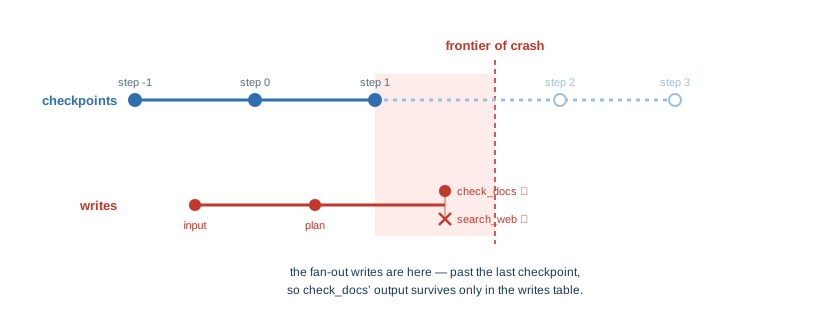
check_docs’s write landed past the last checkpoint (step 1), and the fan-out step’s own checkpoint (step 2) was never written. Whatever falls in that gap survives only in the writes table — which is what the “after the crash” rows above are.
That is the writes table’s whole reason to exist: task-level fault tolerance, finer than a checkpoint can give, for exactly the case a checkpoint cannot cover — a superstep that dies half-finished. A straight line produces the same case in a window too narrow to catch, which is why we fanned out.
And notice search_web’s failure is a row in that same writes table — channel __error__. That is the table’s other job: it records a node’s error or a human interrupt right alongside ordinary output. These special writes live at reserved negative indices so they can never collide with a task’s real channel writes:
from langgraph.checkpoint.base import WRITES_IDX_MAP

for channel, idx in WRITES_IDX_MAP.items():
print(f" {channel:<14} -> index {idx}")===== 3. Reserved special-write channels (negative indices) =====
__error__ -> index -1
__scheduled__ -> index -2
__interrupt__ -> index -3
__resume__ -> index -4So the human-in-the-loop interrupt of Chapter 9 is a __interrupt__ write parked in this same table, waiting for a __resume__ write to answer it, and the error that stopped search_web was filed as an __error__ write next to check_docs’s output, which survived. Errors, interrupts, and everyday node outputs all flow through one store; the negative indices keep the reserved ones out of the way.
26.5 Keys sort as a timeline
A resume has to find “the last checkpoint,” and the surviving writes hang on it. We have been labeling checkpoints by “step,” but that number lives inside the JSON metadata; the rows are keyed by the checkpoint_id column, and its format is what makes “last” cheap to find.
A checkpoint id is a UUIDv6: the high bits are a timestamp, so the ids come out “unique and monotonically increasing,” as the Checkpoint["id"] docstring puts it. Sorting the id strings reconstructs chronological order. You never have to decode a timestamp or consult the step number to know which of two checkpoints came first; lexical string order is time order. (This is the same property that makes ULIDs3 popular as database keys: sortable identity, no coordination needed.)
def show_timeline(db_path: str, saver: SqliteSaver) -> None:
    step = step_labels(saver)                   # checkpoint_id -> step
    ids_sorted = [r[0] for r in db_rows(db_path,
        "SELECT checkpoint_id FROM checkpoints ORDER BY checkpoint_id")]

    # Prove it WITHOUT printing the varying ids: map each sorted id back to its
    # stable step number. A monotonic key order must yield monotonic steps.
    steps_in_key_order = [step[cid] for cid in ids_sorted]
    increasing = all(a < b for a, b in zip(steps_in_key_order, steps_in_key_order[1:]))
    print(f"steps, in checkpoint_id sort order : {steps_in_key_order}")
    print(f"strictly increasing                : {increasing}")

    # the parent_checkpoint_id column is the same timeline, walked backward
    parents = dict(db_rows(db_path,
        "SELECT checkpoint_id, parent_checkpoint_id FROM checkpoints"))
    walk, cur = [], ids_sorted[-1]              # start at the newest
    while cur is not None:
        walk.append(step[cur])
        cur = parents[cur]
    print(f"parent_checkpoint_id chain (newest->oldest): {walk}")

print(f"[varies] one raw checkpoint_id : {ids_sorted[-1]}")===== 4. Checkpoint ids sort as a timeline (UUIDv6 = monotonic) =====
steps, in checkpoint_id sort order : [-1, 0, 1, 2, 3]
strictly increasing : True
parent_checkpoint_id chain (newest->oldest): [3, 2, 1, 0, -1]
[varies] one raw checkpoint_id : 1f1ab496-cf26-6558-8003-f519adb8cfe2Two independent views of one timeline, and they agree. ORDER BY checkpoint_id and the steps they map to come out [-1, 0, 1, 2, 3], strictly increasing, which can only happen if the ids themselves are time-ordered. Follow the parent_checkpoint_id column from the newest row backward and you visit the same checkpoints in reverse: [3, 2, 1, 0, -1].
The last line is the only place we print a raw id, and it is tagged [varies]: that string is different on every run, because its timestamp bits move. Its third group always starts with 6, the UUID version nibble — the 6 of “v6.” You will never see the same id twice, and you never need to; only its sort position matters, and that is stable.
26.6 The public read of the same timeline
get_state_history() — the API Chapter 8 used for time travel — is nothing more than this timeline read through the front door. It yields StateSnapshots newest-first, and unlike the raw ids, its fields are fully deterministic:
- 1
-
inputfor the pristine step -1 checkpoint — the one that exists before your input is folded in, so yourquestionis in the writes parked on it, not in it;loopfor every step the runtime’s superstep loop produced.get_state_historyyields newest-first, so that step -1 is the last row in the output below. - 2
-
snap.nextis the next batch of nodes to execute from this snapshot — not which writes are parked here. In this finished run the two line up; pause a live run beforegenerateand you would seenext=('generate',)withpending_writesstill empty, becausegeneratehas not run yet.
===== 5. get_state_history(): the timeline, newest-first =====
  step  3  source=loop    next=(done)
  step  2  source=loop    next=generate
  step  1  source=loop    next=check_docs, search_web
  step  0  source=loop    next=plan
  step -1  source=input   next=__start__
Step 1’s next=check_docs, search_web is the fan-out named outright: from that snapshot the graph’s next move is to run both retrievals. In a finished run like this one, “next to run” and “whose writes advanced this checkpoint” happen to coincide (which is why the column reads so cleanly), but they are different facts, and the Gold challenge turns on the difference. After the crash in Section 26.4 the newest snapshot’s next was ('search_web',) — the sibling still to run — with check_docs’s write and an __error__ parked under it, which is the state the public API shows you when a superstep died half-finished.
26.7 Inside the checkpoint blob: values and versions
Surviving writes are only half the story; the other half is how the runtime decides which nodes to run at all. That is not a resume trick — it is LangGraph’s ordinary scheduler, the machinery that advances every superstep of every run. A fresh invoke rides on it (the version maps below were filled by this chapter’s normal, un-crashed run), and a resume is nothing more than that same loop re-entered from a checkpoint. It decides by version. get_tuple() rehydrates a single checkpoint by deserializing its checkpoint blob — and inside that one blob sit three maps:
channel_values— the live state, each channel’s current value.channel_versions— each channel’s current version, a monotonic version stamp.versions_seen— per node, the trigger versions that node has already consumed.
None of the three is a SQL table. That is why section 1’s .tables listed only checkpoints and writes: these maps are fields packed into the opaque checkpoint column (a PostgresSaver splits the values into a checkpoint_blobs table, but the versions still ride in the checkpoint). They surface only once deserialized:
def show_channel_values_and_versions(saver: SqliteSaver) -> None:
    latest = saver.get_tuple(THREAD)   # all three maps live in latest.checkpoint
    print("channel_values -- the live state (each channel's current value):")
    for chan, val in latest.checkpoint["channel_values"].items():
        print(f"  {chan:<12} = {val!r}")

    # version string "<counter>.<random>", two fields (the 0 after the dot is the
    # random float's leading digit): only the counter prefix orders
    versions = latest.checkpoint["channel_versions"]
    prefixes = {ch: int(v.split(".")[0]) for ch, v in versions.items()}
    print("\nchannel_versions -- each channel's version (a run-wide counter, +1 per superstep):")
    for chan, pref in sorted(prefixes.items(), key=lambda kv: (kv[1], kv[0])):
        tag = "  <- internal routing channel" if chan.startswith(("branch:", "__")) else ""
        print(f"  {chan:<22} v{pref}{tag}")

    # versions_seen: per node, the trigger versions it has already consumed. This is
    # Pregel's scheduler, not a resume-only check -- on every superstep it compares
    # these against channel_versions: a node runs when a trigger it subscribes to is
    # newer than what it last saw, and is left alone once it has already seen it.
    print("\nversions_seen -- per node, the trigger version it last consumed:")
    for node, seen in latest.checkpoint["versions_seen"].items():
print(f" {node:<12} {({c: int(v.split('.')[0]) for c, v in seen.items()})}")===== 6. Inside the checkpoint blob: values, versions, versions_seen =====
channel_values -- the live state (each channel's current value):
question = 'How do I configure Kafka?'
steps = ['plan', 'check_docs', 'search_web', 'generate']
answer = 'final answer'
channel_versions -- each channel's version (a run-wide counter, +1 per superstep):
__start__ v2 <- internal routing channel
question v2
branch:to:plan v3 <- internal routing channel
branch:to:check_docs v4 <- internal routing channel
branch:to:search_web v4 <- internal routing channel
answer v5
branch:to:generate v5 <- internal routing channel
steps v5
[varies] one raw version string: '00000000000000000000000000000002.0.051950792330492046'
(the '.<random>' suffix is a per-write tie-breaker)
versions_seen -- per node, the trigger version it last consumed:
__input__ {}
__start__ {'__start__': 1}
plan {'branch:to:plan': 2}
check_docs {'branch:to:check_docs': 3}
search_web {'branch:to:search_web': 3}
generate {'branch:to:generate': 4}channel_values is the doc-bot’s live state: the question you passed, the steps that accumulated, the answer. channel_versions is the part a resume reads. Every channel carries a version, a string built as f"{counter:032}.{random:016}" — two fields, not three; the 0 you see in the middle is the leading digit of the random float. Only the counter orders, and it is zero-padded to 32 digits so that ordering survives string comparison. The trailing float is a per-tick tie-breaker (that suffix is the second [varies] line).
The counter is not a per-channel “written N times” count — it is one monotonic number for the whole run that ticks forward once per superstep. For an ordinary state channel, its version is the tick at which it was last written. That is why question is v2, not v1: the pristine step -1 checkpoint has already stamped the internal __start__ channel v1, and your input lands at the next tick, v2, which stamps question, steps, and branch:to:plan all v2 at once. question is never written again, so it stays v2; steps, touched every superstep, climbs 2 → 3 → 4 → 5 — the surest sign the number is shared, not per-channel.
The branch: and __ channels are the runtime’s own routing bookkeeping — edges firing, not fields you declared — and they follow a subtler rule: a channel’s version also advances when a node consumes it, not only when one is written. branch:to:check_docs reads v4 here because plan wrote it at v3 and check_docs then consumed and cleared it, ticking the version again. So read a routing channel’s number as “when it last changed,” and don’t lean on its exact tick. It is this saver’s encoding of this particular graph, and another saver owes you nothing about it.
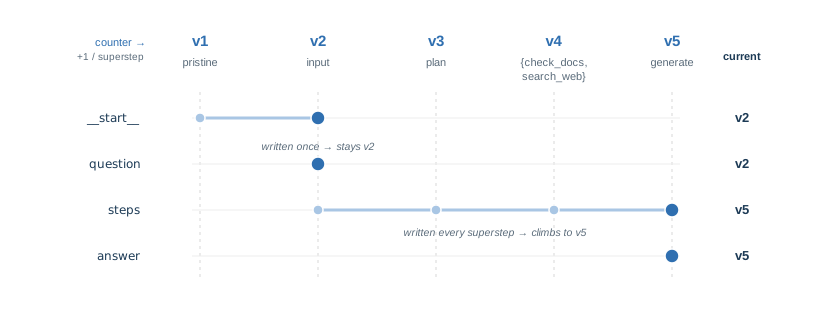
v1..v5, top); each channel is stamped with the tick it was last written, and that stamp is its current version (right). question, written only at the input tick, stays v2; steps, written every superstep, climbs to v5. (The branch:to:* routing channels advance on a subtler rule — a consume ticks them too — and are left off here.)
The third block, versions_seen, is the other half — and here is the answer to “where does a node record the version it saw”: it does not. A node is a plain function that records nothing; the checkpoint keeps versions_seen, keyed by node name, and each entry is the trigger version that node last consumed. Across a completed superstep this is how a clean resume decides what to skip: a node re-runs only when a trigger channel it subscribes to is present with a version newer than the one that node saw, and is skipped when it has already seen it. (That “present” matters — once a routing channel has been consumed and cleared it is no longer a live trigger, which is why the finished graph does not re-fire even though every channel_versions entry now outnumbers what any node saw.)
A crashed resume works differently, and Section 26.4 is the case. The fan-out superstep never checkpointed, so neither sibling appears in this versions_seen — the map above stops at plan. What separates the two on resume is not versions_seen but their pending writes on the last checkpoint4: check_docs left a successful write, which the runtime replays, matching it by task_id, instead of re-running the node, while search_web left only an __error__ write, a failed task, so it runs again. versions_seen skips nodes across a superstep that finished; write-replay is what keeps a finished sibling’s output when the superstep did not.
26.8 Everything in State is on disk, in the clear
Section 26.7 decoded the checkpoint blob and read the channel values straight out of it. That cuts both ways: whatever your graph puts in State is sitting in that file in plaintext, and strings will find it — no key, no parsing, just the raw bytes. A SqliteSaver is a database of your run’s state, and like any database it holds at rest exactly what you wrote to it.
For the doc-bot that is not an abstract worry. State accumulates the things a graph works on — the user’s question, retrieved documents, tool outputs, the conversation so far — and some of that is data you are on the hook to protect. Plant a sensitive value in State, run one superstep against a SqliteSaver, and it is in the file, findable with strings (code/ch24_secrets_and_migration.py runs this, and the migration checks the Gold challenge sends you back to):
  plain file     : secret readable with `strings` -> True
  encrypted file : secret readable with `strings` -> False
  with the key   : round-trips -> True
  without it     : NotImplementedError: Unknown serialization type: msgpack+aes
The control for data that legitimately lives in State is encryption at rest, and it is a serializer swap — the store stays the same:
from langgraph.checkpoint.serde.encrypted import EncryptedSerializer

os.environ["LANGGRAPH_AES_KEY"] = ...        # 16, 24 or 32 bytes
saver.serde = EncryptedSerializer.from_pycryptodome_aes()
The chapter already runs on langgraph-checkpoint-sqlite; encryption is the one piece that needs more — a separate package for the cipher, which from_pycryptodome_aes names in the method:
pip install langgraph-checkpoint-sqlite==3.1.1 pycryptodome==3.23.0Read those four lines of output in order, because the last one is the operational cost. Encryption is not a setting you can turn on and forget: the key becomes part of your backup. A saver without it does not degrade gracefully or return placeholders — it raises NotImplementedError on the stored type, so every parked thread written under that key is unreadable until the key comes back. Rotating it means rewriting every parked thread under the new key.
Credentials are the exception, and encryption is the wrong tool for them. An API key does not belong in State at all — not because the file is unencrypted, but because encrypting the file would not save you: the key would still be in every get_state(), in every trace Chapter 24 records, and in whatever your /run/{thread} endpoint returns. State is copied out everywhere it goes. Secrets ride runtime.context (Section 14.8) instead — per-run, passed in at invocation, never written to either table. Encrypt the user data you must persist; keep the credentials out of the persisted path entirely.
26.9 The answer
Why do some writes survive a crash and some don’t? Because a node’s output is written to the writes table when that node returns, and folded into a checkpoint only when the superstep completes. Outputs from earlier supersteps are in the checkpoints table; outputs from finished siblings of the crashed node are parked in the writes table on the last checkpoint. A resume finds that checkpoint by sorting the UUIDv6 keys and replays the parked writes: a finished sibling’s successful write is reapplied by task_id rather than recomputed, so check_docs is not re-run. The node that was still running when the process died never returned, so it left only an __error__ write; its output does not survive because it never existed, and that node runs again.
Three consequences for the doc-bot, one for each moment you work with the store:
| Moment | What follows from the two tables |
|---|---|
| In design | Split a long node if you want its partial progress to survive a crash: the writes table records progress at node boundaries. |
| In deployment | Surviving a restart is the store’s job, not the graph’s — a separate axis from the run’s durability mode, which only sets when a write lands. We watched a SqliteSaver carry a finished sibling’s output — check_docs’s — across a real process death that left no checkpoint to hold it, and let a fresh process finish the run; an InMemorySaver’s two tables would have died with the first process. |
| In operation | A resume that redid too much work, or too little, is diagnosed by reading the writes table and the versions_seen map on the newest checkpoint — which is what this chapter’s inspections do. |
That closes the machine, at the level of mechanism. Since Chapter 21 you have built each part a service needs on its own — retries, an HTTP surface, traces, external tools, durable state — as the independent demos this Part is made of. They are not yet wired into one service, and Chapter 20’s suite tests Chapter 20’s doc-bot, not the HTTP layer, the tracer, or the MCP tools. Standing them up together is real work; the way to trust it is the method Chapter 20 taught, applied to the combination — drive a single thread through a tool failure, a human gate, an HTTP resume, a trace, and a restart, and assert what each step leaves behind.
WarningGotcha: the checkpoint is a resumption log, not a transaction log
All this durability reads as transactional — a graph that survives a crash looks like a workflow engine, and a checkpointer looks like the place your in-flight operations are safe. It is not. The writes table records a tool’s return value so a resume can replay it, not the fact that a side effect happened. That distinction works in your favor on the way in: on resume the runtime replays the stored result instead of calling the tool again, so a completed charge_card does not fire twice. But it cuts the other way too — the checkpoint has no concept of a side effect at all. There is no compensation, no idempotency, no rollback. Abandon a thread parked just after a charge and nothing un-charges it; the store never knew a charge was a thing that happened, only that a value came back.
So keep the layers straight: the checkpoint resumes computation, it does not manage transactions. Correctness for an irreversible, multi-step operation — idempotency keys, compensations, a saga log — belongs to the system that owns the side effect, exactly as it would if there were no agent in the picture at all. The trap is letting the durable checkpoint quietly become your orchestrator, because then you have put transaction state in a log that has no transaction semantics; the fix is to move the orchestration out, not to keep the agent alive long enough to finish it.
The rest of Part III turns from the machine to what we feed it. The doc-bot has searched with a hard-coded stub since Part I; the retrieval-augmented generation sub-part replaces that stub with real retrieval — first a hand-written cosine similarity to see the idea bare, then a genuine vector store the doc-bot queries for the documents it answers from. The graph knows how to remember; next it learns what to look up.
New pieces in this chapter
| Piece | Usage |
|---|---|
| Value | |
SqliteSaver |
A file-backed checkpointer: two SQL tables, checkpoints + writes. SqliteSaver(sqlite3.connect("ch23.db")), or SqliteSaver.from_conn_string(path); survives the process, unlike InMemorySaver — pip install langgraph-checkpoint-sqlite |
checkpoints / writes tables |
The two tables, readable with any sqlite3 client. checkpoint_id/parent_checkpoint_id are the snapshot linked list; task_id/channel tag each write; checkpoint and writes.value are msgpack blobs, metadata is plain JSON (json_extract-readable) |
WRITES_IDX_MAP |
The reserved special-write channels and their negative indices. WRITES_IDX_MAP.items(); __error__ is -1, __interrupt__ -3 — negative so they never collide with task writes. Undocumented constant in langgraph.checkpoint.base, not part of the published API — may move without notice |
| API | |
SqliteSaver.list() |
Iterate a thread’s checkpoints as CheckpointTuples, metadata already deserialized. saver.list(THREAD); we use it only to label run-varying ids by their stable step |
SqliteSaver.get_tuple() |
Rehydrate one checkpoint, channel values deserialized from its checkpoint blob. saver.get_tuple(THREAD); the raw read beneath get_state() — internal-facing |
Code in this chapter
| File | What it runs |
|---|---|
code/ch24_inside_persistence.py |
A reading of the checkpoint tables themselves: what a superstep writes, and what survives a crash mid-fan-out. |
code/ch24_secrets_and_migration.py |
What the storage layer will not warn you about: a secret that lands in the checkpoint, and a schema that changes while a thread is parked. |
Challenge
The first of these is pure reading — no new nodes, just the graph and its saver — and self-verifying: what you observe in the storage is the answer, with a worked solution beside it to check against. The second changes the graph underneath a parked thread and asks what the store does about it. (The other half of the chapter’s storage story, a fan-out sibling surviving a crash in the writes table, is Section 26.4, which you can rerun and read the same way.)
🥉 Bronze — read two threads side by side
The chapter ran one thread_id. Run the same compiled graph twice, on "inspect-A" and "inspect-B", with two different questions, against one SqliteSaver. Then open the file and confirm the two threads are separate filing cabinets: SELECT DISTINCT thread_id FROM checkpoints returns both, and every row carries its own thread_id. For each thread, SELECT checkpoint_id ... WHERE thread_id=? ORDER BY checkpoint_id and map the ids back to steps (via saver.list); you should recover that thread’s own [-1, 0, 1, 2, 3] timeline, independently. Check that no checkpoint id appears under both threads (UUIDv6 makes collisions vanishingly unlikely). Then read the CREATE TABLE back with SELECT sql FROM sqlite_master WHERE name='checkpoints' and find the line PRIMARY KEY (thread_id, checkpoint_ns, checkpoint_id): why is the table keyed by thread_id first, before namespace and id?
 Worked solution with tests:
 code/answers/ch24_two_threads.py.
🥇 Gold — change the graph under a parked thread
Persistence makes a subtler promise than “the state survives” — it promises the state survives a deploy. Test that promise. Park a thread before a node with graph.invoke({...}, cfg, interrupt_before=["generate"]), so it stops with next=('generate',) and its inputs sitting on disk. Now resume it — invoke(None, cfg) — but against a graph you have changed underneath it. Run it two ways: in one, the node generate has been renamed to respond; in the other, the State key question has been renamed to query. Before you run either, write down your prediction: does the resume raise? Does answer get filled? Where does the old question value go?
The thing to notice is the failure mode, not the fix. The renamed node is silently skipped and the run reports success, no exception, with an answer still at the empty string the graph initialized it to. The renamed key is subtler: the old value is stranded on disk under a name the new schema no longer reads, so query is simply absent. (Whether that absence raises is the reader’s choice, not the store’s — the companion reads it with s.get("query"), which returns None; s["query"] would KeyError.) Both failures are one identifier wide, and neither shows up in a test that starts its threads on the version it is testing — which is why the rule is to treat node names and State keys as a wire format between deployments: add fields and nodes, never rename them in place, and retire an old node only once nothing is parked at it.
LangChain documents which changes are safe across deployment versions — completed threads survive topology changes, interrupted threads do not, and a renamed State key is marked Unsafe (old data orphaned): Managing State Schema Changes Across Deployment Versions. Reproduce both failures with code/ch24_secrets_and_migration.py.
MessagePack (https://msgpack.org) — a compact binary serialization, essentially JSON’s data model in bytes: smaller and faster to write, and, unlike Python’s
pickle, a cross-language standard that runs no code on read. The saver’sserdepacks each value on the way in and unpacks it on the way out. Only thecheckpointandwrites.valuecolumns use it;metadatais plain JSON.↩︎UUIDv6: a revision of the UUID layout whose leading bits are a timestamp, so the ids are unique and monotonically increasing — sortable by creation time as plain strings, no coordination needed. Section 26.5 takes one apart; here, notice all five share a long leading prefix (same run, milliseconds apart) and sort into step order.↩︎
Universally Unique Lexicographically Sortable Identifier: https://github.com/ulid/spec. A 128-bit id whose leading 48 bits are a millisecond timestamp, so sorting the strings sorts by time — the same trick UUIDv6 plays with a different layout.↩︎
The scheduler still puts both siblings on the task list on resume — neither has consumed its trigger, so
versions_seenschedules them exactly as it would in a fresh run. The pending writes decide only what happens to an already-scheduled task:check_docs’s successful write is replayed and its function never runs, whilesearch_web’s__error__is not replayed, so it re-executes.versions_seenschedules; write-replay reuses.↩︎