flowchart LR
query(["query"]) --> svc{{"Service<br/>selector: color = green"}}
svc -->|"all traffic"| green["green pods · docs_v2"]
svc -. "selector back to blue<br/>= rollback" .-> blue["blue pods · docs_v1 · kept"]
30 Versioning & Blue-Green

The last three chapters built an index and then walked away from it. A real one does not stay still: the docs upstream keep changing — a page rewritten, a product renamed, a section deleted — while something is serving queries from the index on disk right now. A live index raises two questions a throwaway one never did. When three documents out of five thousand change, do you re-embed five thousand or three? And when a re-index goes wrong, can you get back to the version that worked, without a rebuild and without a window where queries hit a half-written index?
Treat the index as something you version, not something you overwrite. Then re-embedding only what changed, cutting over, and rolling back are each one write.
This chapter is two mechanisms, one per question, and neither calls a chat model. The first is index bookkeeping — ordinary, deterministic Python around the same embedding calls. The second is a deployment, built where deployments live: on a Kubernetes cluster, with the cut-over as one line of one manifest.
30.1 Part 1 — Versioning: re-embed only what changed
Here is the state of the store after this chapter’s first program has synced “version 2” of a three-document corpus:
    kafka    v2 #2fd94753d946  Kafka batch consumption: spring.kafka.listener.type=batch, plus max-poll-records
    mysql    v1 #7b32f618c9ff  MySQL indexing: add a B+ tree index to speed up queries
    pg       v2 #45022c1c0ed1  PostgreSQL: use the pgvector extension for vector search
mysql is still at v1. That reads like a bug the first time you see it, and it is the design: the mysql text did not change between versions, so the sync never re-embedded it, and the tag records the version of its last real change. Re-stamp it to v2 and the tag would stop meaning that: it would say “current” instead of “last changed,” and the question “which version of the docs is this answer from?” would lose its answer.
Embedding is the expensive step: network round-trips to the model, one per document. So the goal of an incremental sync is blunt: touch the model as few times as possible. Re-embed a document only when its content moved; leave every unchanged document where it is; drop the vectors whose source document is gone.
To decide “did this move?” cheaply, we need two things on every stored vector: a stable id that survives across syncs, and a content hash we can compare without looking at the vector at all.
import hashlib
import os

from langchain_chroma import Chroma
from langchain_openai import OpenAIEmbeddings

DB_DIR = os.path.join(os.path.dirname(__file__), "chroma_versioned")   # the on-disk collection

# The same local embedding model every RAG chapter uses, through the same
# NomicEmbeddings task-prefix adapter (Chapter 25, RAG Foundations); the runnable file
# defines it inline.
embeddings = NomicEmbeddings(
    base_url="http://localhost:1234/v1",     # your local server, not the OpenAI cloud
    api_key="lm-studio",                     # the local server ignores the key
    model="text-embedding-nomic-embed-text-v1.5",
    check_embedding_ctx_length=False,        # skip the tiktoken probe local servers do not serve
)

vectorstore = Chroma(
    collection_name="versioned",
    embedding_function=embeddings,
    persist_directory=DB_DIR,
    collection_metadata={"hnsw:space": "cosine"},
)


def content_hash(text: str) -> str:
    """Same content -> same hash; change one character -> the whole hash changes."""
    return hashlib.sha256(text.encode("utf-8")).hexdigest()[:12]
sha256 is a content fingerprint: identical text always produces the identical twelve hex characters, and flipping a single character scrambles all twelve. So “has this document changed since we last embedded it?” becomes “is the stored hash still equal to the hash of the current text?”, a string compare with no model call.
30.1.1 The reconcile: four cases, by id
A sync takes the source of truth — a {doc_id: content} dict of what the documents should be right now — and brings the store in line with it. Every document falls into one of four cases:
| Source vs. store | What we do | Model call? |
|---|---|---|
| id is new (not in the store) | embed and write | yes |
| id present, hash unchanged | skip — leave it alone | no |
| id present, hash changed | re-embed, then write over the same id | yes |
| id in the store, gone from source | delete | no |
Here is that table as code. It reads the store once to learn which hash it has on file for each id, then walks the source of truth deciding each document, then sweeps up anything the source no longer mentions.
def sync_index(docs: dict, version: str) -> None:
    """Bring the vector store in line with `docs`, incrementally.

    docs:    {doc_id: content} - the SOURCE OF TRUTH for this sync.
    version: the tag stamped on everything written this pass, stored in metadata
             so an answer can later be traced back to a document version.
    """
    print(f"\n===== sync index -> version {version} =====")

    # 1) Read what the store currently holds: doc_id -> the hash it has on file.
    existing = vectorstore.get()                 # ids / documents / metadatas
    stored = {m["doc_id"]: m["content_hash"] for m in existing["metadatas"]}

    # 2) Reconcile document by document against the source of truth.
    for doc_id, content in docs.items():
        h = content_hash(content)
        meta = {"doc_id": doc_id, "content_hash": h, "version": version}

        if doc_id not in stored:
            # New: embed and write.
            vectorstore.add_texts([content], ids=[doc_id], metadatas=[meta])
            print(f"  [new]       {doc_id}  -> embedding")
        elif stored[doc_id] != h:
            # Changed: write over the same id — that IS the upsert.
            vectorstore.add_texts([content], ids=[doc_id], metadatas=[meta])
            print(f"  [changed]   {doc_id}  -> re-embedding (hash {stored[doc_id]}->{h})")
        else:
            # Unchanged: skip; no model call.
            print(f"  [unchanged] {doc_id}  -> skip (hash {h} unchanged, no recompute)")

    # 3) Delete: anything the store holds that the source of truth no longer has.
    for doc_id in set(stored) - set(docs):
        vectorstore.delete(ids=[doc_id])
        print(f"  [deleted]   {doc_id}  -> removed from store")
The doc_id and content_hash the sync reads are the fields Chapter 27 wrote with every document and Chapter 28 carried down to every chunk; the sync is the first code that reads them, not the first that needs them. One thing the row metadata does not carry, because it belongs to the whole collection: the embedding model and its prefixes. Change either and every stored vector means something else, so the right move is a new collection — the blue-green cut-over below — never an in-place update that leaves old and new vectors side by side in one index. 1. Every write stamps a version into the vector’s metadata. The sync never reads it; it is for afterward, so an answer can be traced to the content that produced it. 2. The line to look at is ids=[doc_id]. We hand Chroma the document’s own stable id, not a random UUID, so on the next sync we can look a document up by the same id, compare hashes, and overwrite in place. 3. Re-embedding a changed document is a plain write on a known id: Chroma overwrites the row, so there is no orphaned copy and no pre-delete. Resist adding one. delete then add_texts looks tidier and quietly makes a failure unrecoverable — the embedding call is a network round-trip, and if it raises after the delete, the old vector is gone and that document is simply missing from the index until someone notices. Overwriting in place leaves the previous answer serving until the new one actually arrives.
WarningGotcha: a random id makes every update leave a duplicate behind
add_texts assigns a fresh UUID to every document if you let it, and for a one-shot index that is fine. For a synced index it breaks the half of the reconcile that writes. The diff still works — stored is keyed by the doc_id in the metadata, which you control, so an unchanged document is still recognised and still skipped. What breaks is everything addressed by id: delete(ids=[doc_id]) and a write to ids=[doc_id] both name a row that does not exist under that key, because the row is filed under a UUID nobody kept. So a changed document is added again under a second random id while the old vector stays put, and a deleted document is never removed at all. The store fills with stale duplicates of documents you thought you updated, retrieval starts returning both versions, and nothing prints an error. Derive the id from something durable about the document (its path, its primary key) and keep it constant across syncs — the metadata doc_id is how you find a document, the row id is how you change it, and they have to agree.
30.1.2 The version rides along, so answers are traceable
When a query comes back, the hit carries the version of the document that answered it, so you can say which content produced any given answer.
def query(q: str) -> None:
    """On a query, carry the hit's version/hash back out - the answer is traceable."""
    hits = vectorstore.similarity_search(q, k=1)
    print(f"  query \"{q}\" hit:")
    for doc in hits:
        m = doc.metadata
        print(f"    {doc.page_content}  <- doc_id={m['doc_id']} v{m['version']} #{m['content_hash']}")
Now run code/ch28_versioning.py. We build version 1 from three documents, sync the same content again to see the skip path fire, then sync a version 2 that changes kafka, leaves mysql untouched, adds pg, and drops redis: one document in each of the four cases.
===== sync index -> version 1 =====
  [new]       kafka  -> embedding
  [new]       redis  -> embedding
  [new]       mysql  -> embedding
  store contents:
    kafka    v1 #b6883f893046  Kafka batch consumption: set spring.kafka.listener.type=batch
    mysql    v1 #7b32f618c9ff  MySQL indexing: add a B+ tree index to speed up queries
    redis    v1 #87550ad11ba8  Redis connection pool: configure via spring.data.redis.*

===== sync index -> version 1 =====
  [unchanged] kafka  -> skip (hash b6883f893046 unchanged, no recompute)
  [unchanged] redis  -> skip (hash 87550ad11ba8 unchanged, no recompute)
  [unchanged] mysql  -> skip (hash 7b32f618c9ff unchanged, no recompute)

===== sync index -> version 2 =====
  [changed]   kafka  -> re-embedding (hash b6883f893046->2fd94753d946)
  [unchanged] mysql  -> skip (hash 7b32f618c9ff unchanged, no recompute)
  [new]       pg  -> embedding
  [deleted]   redis  -> removed from store
  store contents:
    kafka    v2 #2fd94753d946  Kafka batch consumption: spring.kafka.listener.type=batch, plus max-poll-records
    mysql    v1 #7b32f618c9ff  MySQL indexing: add a B+ tree index to speed up queries
    pg       v2 #45022c1c0ed1  PostgreSQL: use the pgvector extension for vector search

===== query (answer traceable to a version) =====
  query "how to configure kafka batch consumption" hit:
    Kafka batch consumption: spring.kafka.listener.type=batch, plus max-poll-records  <- doc_id=kafka v2 #2fd94753d946
  query "postgres vector search" hit:
    PostgreSQL: use the pgvector extension for vector search  <- doc_id=pg v2 #45022c1c0ed1
The second sync is three [unchanged] lines and no -> embedding: the content did not move, so the model was never called. Version 2 then does one thing per document. kafka’s hash changed (b688… to 2fd9…) so it re-embeds; mysql’s hash is identical so it skips; pg is new so it embeds; redis is gone from the source so its vector is deleted. Two model calls for four documents. The contents block is the mixed-version store from the opening, mysql still at v1, and the query at the end shows the tag doing its job: the Kafka hit comes back v2 #2fd94753d946, the same hash the sync printed when it re-embedded it.
WarningGotcha: the sync unit is a document, the retrieval unit is a chunk
Read sync_index’s signature once more: {doc_id: content}. It reconciles whole documents, and Chapter 28 already replaced the retrieval unit with chunks. In a real pipeline one document becomes many rows, so the id has to say which piece it is — doc_id plus a chunk index, or a hash of the chunk’s own text:
for i, chunk in enumerate(split(content)):
    ids.append(f"{doc_id}#{i}")
Which of those two you pick is not cosmetic, and it decides how a re-chunk behaves.
doc_id#iis positional. Edit one paragraph near the top and every chunk after it shifts by one, so a one-word fix rewrites the whole document’s worth of rows: the four-branch reconcile still works, it just reports the entire document as changed.- A content hash of the chunk survives that — untouched paragraphs keep their ids no matter what moved above them — at the cost that you can no longer ask “what is chunk 3 of this document”, because the id no longer knows.
And here is the part that connects to the rest of this chapter. Change the splitter and the reconcile stops being incremental in any useful sense. New boundaries mean different text in most chunks, so under a content-hash scheme most ids in the store are absent from the source and most ids in the source are absent from the store: a churn of deletes and re-embeds roughly the size of the corpus. (Not every row, necessarily — a paragraph the new boundaries happen to reproduce byte-for-byte keeps its hash, and under doc_id#i the positions survive while the contents under them shift, which is arguably worse: same id, different text.) Incremental sync has not failed — it has correctly concluded that little in the new index corresponds to anything in the old one, which is what a re-chunk is.
30.2 Part 2 — Blue vs Green
Incremental sync is the right tool for a steady trickle of edits. Some changes are not edits to a few documents but changes to how the whole index is built: a new chunking strategy, a different embedding model, a re-split of the entire corpus. That is a full rebuild, and doing it in place is dangerous for two reasons. While the rebuild runs, queries hit an index that is half old and half new. And if the finished rebuild turns out worse than what it replaced, you have already destroyed what it replaced.
Choose a route for this half before reading on. To study build, stage, switch and rollback without a cluster, run code/ch28_bluegreen.py: the same steps in one Python process, an environment variable standing in for the deployment. To run the deployment itself, use deploy/ch28-bluegreen/ — it needs a local Kubernetes (Docker Desktop’s is enough), Helm, kubectl and a reachable embedding server — and it shows the one thing the stand-in cannot: a colour that fails to become Ready while the other keeps serving. The text below follows the deployment; nothing in it assumes you have one.
Blue-green deployment is one idea borrowed from web operations: never mutate the thing that is serving. Build the new version beside the old one as a separate collection; bring up a second serving environment, green, on it, while the first, blue, still answers every request; and when green is healthy, switch all traffic to it by changing one routing setting. Blue stays up after the switch, so a rollback is the same setting changed back: fast, and no rebuild. You retire blue only once green has proven itself.
Two settings decide what answers: which colour the Service points at, and which collection each colour’s pods hold. Both are deployment configuration, not data. They belong with the model server’s URL and the database connection string: values the deployment sets and a process reads once at startup, never something the application writes.
Notice what does not change between blue and green: the code. The image is the same; only the binding to a collection differs, and that binding happens once, at startup. That is why an index switch involves processes at all — a process bound to docs_v2 has to exist before anything can answer from it — and why bringing those processes up beside the old ones and moving traffic in one step is exactly what blue-green is. The other way to switch an index keeps the pointer in the data: an alias the process resolves on every request, so the pods never change and the switch is one record. That takes the switch out of the platform’s hands: the alias needs its own validation before it flips and its own history for a rollback, where a deployment gets both from Helm and a readiness probe. This chapter keeps the pointer where the platform can gate it and revert it; Section 30.2.3 sets the three designs side by side.
So this half of the chapter is built where deployments live, which means the two Python processes of the first half become Kubernetes objects. Six of them carry this chapter, and it is worth knowing which does what before any template appears:
| Object | What it is responsible for here |
|---|---|
| Pod | One running container — a doc-bot process, or Chroma. Pods come and go; nothing addresses one directly. |
| Deployment | Keeps a set number of identical Pods running for one colour, and replaces them when their template changes. docbot-blue and docbot-green are two of these. |
| Service | A stable name and address in front of a set of Pods, chosen by label. The cut-over is one Service’s selector changing from blue to green. |
| Job | A Pod that runs once to completion — here, building one index. |
| ConfigMap | Configuration the Pods read at startup, kept apart from the image. |
Helm is how those get written. A chart is a set of templates for these objects; a values file supplies the parameters for one installation; Helm renders the two into the Kubernetes configuration that is actually applied. An installed chart is a release, and each helm upgrade adds a revision to that release’s history — which is what makes rollback a command rather than a plan. So when a template below says { .Values.embedding.model }, that is Helm substituting a value at install time, and the thing it produces is a ConfigMap the Pods will read.
The companion’s deploy/ch28-bluegreen/ runs on a Kubernetes cluster — Docker Desktop’s is enough — packaged as two Helm charts:
- the serving stack — the vector store as a Service with a volume, two doc-bot Deployments,
docbot-blueanddocbot-green, each with its ownactiveIndex, and one Service whose selector names the colour that takes traffic; - one release per index build — a Job that writes one collection and marks it complete.
Figure 30.1 is the whole deployment as it runs; the rest of the section reads it one template at a time.
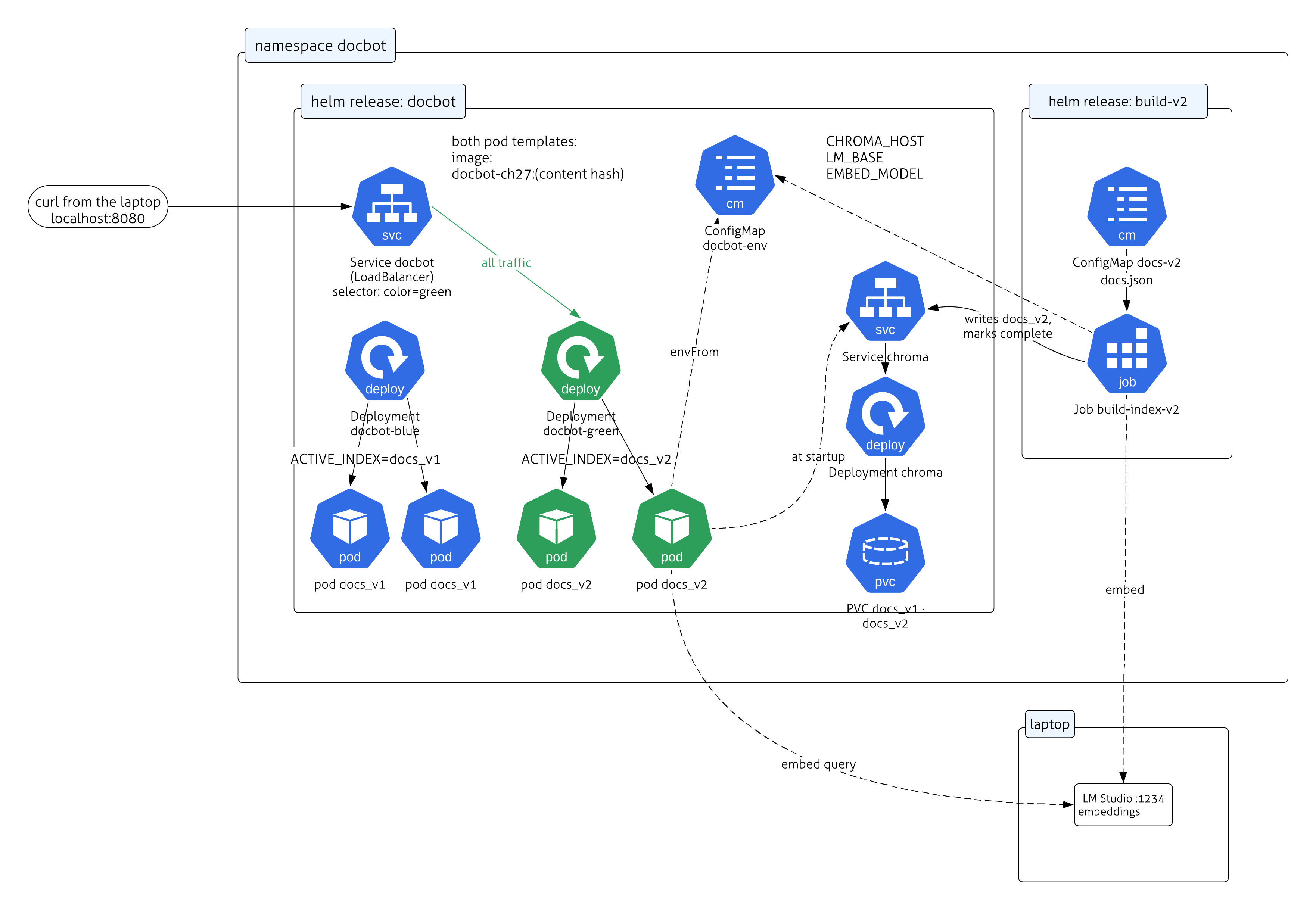
docbot holds the shared ConfigMap, Chroma behind its Service with the volume that carries every collection, the two doc-bot Deployments — blue on docs_v1, green on docs_v2, each pod template naming its collection and the image — and the Service the laptop reaches as a LoadBalancer, whose selector picks green; build-v2 holds one index build — a ConfigMap of source documents and the Job that writes docs_v2 through Chroma’s Service and marks it complete. Both the Job and the serving pods reach the embedding model on the laptop.
The picture is checkable. Bring the stack up:
$ cd deploy/ch28-bluegreen
$ make up
That builds the image, installs Chroma and the shared ConfigMap, runs the first index build, and gives blue its pods on it; green exists but is idle, with no index and no pods. Afterwards the three kinds of object each report the state the chart left them in: the build Job finished and stayed, blue’s two pods are Ready, and the doc-bot Service has an external address (Docker Desktop also maps that port to localhost, which is what the runbook uses):
$ kubectl get pod -n docbot
NAME                           READY   STATUS      RESTARTS   AGE
build-index-v1-lnh6q           0/1     Completed   0          17s
chroma-76bf747c7f-j58d7        1/1     Running     0          22s
docbot-blue-55bdf7554c-mcxnz   1/1     Running     0          10s
docbot-blue-55bdf7554c-zwsrd   1/1     Running     0          10s

$ kubectl get svc -n docbot
NAME     TYPE           CLUSTER-IP     EXTERNAL-IP   PORT(S)          AGE
chroma   ClusterIP      10.96.179.25   <none>        8000/TCP         22s
docbot   LoadBalancer   10.96.249.93   172.18.0.7    8080:32440/TCP   22s

$ kubectl get job -n docbot
NAME             STATUS     COMPLETIONS   DURATION   AGE
build-index-v1   Complete   1/1           5s         17s
And the index is serving. Ask through the Service from the laptop:
$ curl -s -G "http://localhost:8080/ask" --data-urlencode "q=Kafka batch consumption" | python3 -m json.tool
{
    "pod": "docbot-blue-55bdf7554c-mcxnz",
    "active_index": "docs_v1",
    "version": "1",
    "hit": "Kafka batch consumption: spring.kafka.listener.type=batch"
}
Three of the four fields are there to make a deployment legible from the outside:
| Field | Where it comes from | What it tells you |
|---|---|---|
pod |
the process’s own hostname | which replica the Service handed this request to |
active_index |
ACTIVE_INDEX, read from this colour’s Deployment at startup |
which collection this pod holds |
version |
metadata the build Job stamped on the document when it wrote it | which build produced the answer |
active_index and version normally agree, and the value of carrying both is the moment they would not: an answer that names its build is an answer you can trace back to the collection and the source documents it came from.
30.2.1 Two kinds of configuration
The chart’s values.yaml holds everything the deployment decides, and it says up front that its values are of two kinds:
active: blue                  # the colour the Service sends traffic to; changing it is the cut-over
blue:
  activeIndex: docs_v1        # rendered into docbot-blue's POD TEMPLATE
  replicas: 2
green:
  activeIndex: ""             # idle: no index and no pods until a build is staged onto it
  replicas: 0
image:
  tag: ""                     # both pod templates; make sets it to a hash of the app
chroma:
  image: chromadb/chroma:1.5.9
embedding:                    # shared surroundings, rendered into a ConfigMap
  lmBase: http://host.docker.internal:1234/v1     # LM Studio on the laptop, from inside the cluster
  model: text-embedding-nomic-embed-text-v1.5
What every process in the namespace shares — where the vector store is, where the embedding server is, which model — becomes a ConfigMap:
apiVersion: v1
kind: ConfigMap
metadata:
  name: docbot-env
data:
  CHROMA_HOST: chroma
  CHROMA_PORT: "8000"
  LM_BASE: {{ .Values.embedding.lmBase | quote }}
  EMBED_MODEL: {{ .Values.embedding.model | quote }}
ACTIVE_INDEX is deliberately not in it. A ConfigMap is shared by whoever references it, and editing one does not roll anything: pods that read it through envFrom, as these do, keep the values they started with until something restarts them, and pods that mount it as files see the edit land eventually. Neither is a switch. The two settings that decide what answers live where a change is the operation: each colour’s collection on that colour’s pod template, and the live colour on the Service’s selector. Both are in the release’s history, so helm rollback restores either. One template renders both Deployments:
1{{- range $color := list "blue" "green" }}
{{- $env := index $.Values $color }}
---
apiVersion: apps/v1
kind: Deployment
metadata: { name: docbot-{{ $color }} }
spec:
  replicas: {{ $env.replicas }}
  selector: { matchLabels: { app: docbot, color: {{ $color }} } }
  template:
    metadata: { labels: { app: docbot, color: {{ $color }} } }
    spec:
      enableServiceLinks: false
      containers:
        - name: docbot
          image: "{{ $.Values.image.repository }}:{{ $.Values.image.tag }}"
          env:
2            - { name: ACTIVE_INDEX, value: {{ $env.activeIndex | quote }} }
          envFrom:
            - configMapRef: { name: docbot-env }
3          readinessProbe:
            httpGet: { path: /readyz, port: 8000 }
            periodSeconds: 3
            failureThreshold: 3
{{- end }}
---
apiVersion: v1
kind: Service
metadata: { name: docbot }
spec:
  type: LoadBalancer
4  selector: { app: docbot, color: {{ .Values.active }} }
ports: [{ port: 8080, targetPort: 8000 }]- 1
-
Two Deployments, one per colour, each a whole serving environment with its own pods. Pods carry a
colorlabel, which is what the Service will select on. - 2
-
Which collection this colour holds. A new index is staged onto the idle colour —
make stage V=2, which ishelm -n docbot upgrade docbot ./chart --reuse-values --set green.activeIndex=docs_v2 --set green.replicas=2 --wait— and the live colour’s value is never touched while it serves. The application never changes it: the serving process has no setter. The image tag is a hash of the app’s content for the same reason a collection name carries a version: a Deployment rolls only when its pod template changes, and nodes keep serving a cached image under a reused tag, so “I rebuilt:dev” is not a deploy. A new build is a new tag, andmakeputs it inimage.tag. - 3
-
A pod that is not Ready takes no traffic. Staging waits for the idle colour to be Ready and fails if it never is, and
make cutoverrefuses a colour that is not — so a bad index is caught while the Service still points elsewhere. A process that exits at startup is the simplest way to never become Ready. - 4
-
The switch.
make cutoverishelm -n docbot upgrade docbot ./chart --reuse-values --set active=green: one label changes, and traffic shifts to green as the change propagates. No pod starts or stops.make rollbackishelm rollback docbot, the previous revision’s label — blue’s pods never left, so that is instant too. The cut-over is a Service selector, not a pod restart, which is why it is fast — but it is not globally instantaneous. The new selector reaches each node’s forwarding rules through EndpointSlices rather than all at once, so a brief mixed-version window is possible and connections already open may stay on blue. Wait for the selected endpoints to settle, check the serving version, and keep blue available while in-flight work drains.
On the process side, everything the deployment decides arrives through one object, read from the environment exactly once. frozen stops a field being reassigned by accident; that the process never re-chooses its index comes from there being no code path that does, and that nothing in the cluster can change the Deployment comes from Kubernetes authorization, not from Python:
@dataclass(frozen=True)
class Settings:
    active_index: str        # which Chroma collection this process serves
    chroma_host: str
    chroma_port: int
    lm_base: str             # the embedding server
    embed_model: str

    @classmethod
    def from_env(cls) -> "Settings":
        return cls(
            active_index=os.environ["ACTIVE_INDEX"],          # from this colour's Deployment: required, no default
            chroma_host=os.environ.get("CHROMA_HOST", "chroma"),
            chroma_port=int(os.environ.get("CHROMA_PORT", "8000")),
            lm_base=os.environ.get("LM_BASE", "http://host.docker.internal:1234/v1"),
            embed_model=os.environ.get("EMBED_MODEL", "text-embedding-nomic-embed-text-v1.5"),
        )
The four shared values have defaults that match the ConfigMap; ACTIVE_INDEX has none, because a serving process with no index to serve should not start. Opening the collection those settings name is one function, and one argument in it does most of the work:
def open_collection(s: Settings, name: str, must_exist: bool = True) -> Chroma:
    """Attach to an EXISTING collection, or raise. `must_exist=False` is the
    wrapper's own default, create-on-connect: the Silver challenge uses it."""
    return Chroma(
        client=chromadb.HttpClient(host=s.chroma_host, port=s.chroma_port),
        collection_name=name,
        embedding_function=make_embeddings(s.lm_base, s.embed_model),
        collection_metadata={"hnsw:space": "cosine"},
        create_collection_if_not_exists=not must_exist,   # the wrapper's default is True
    )
The process does all of its deciding at import time, before uvicorn opens a port. There is no startup handler and nothing to catch: if the collection is not there, the process is not there either.
SETTINGS = Settings.from_env()                      # ACTIVE_INDEX and the ConfigMap, read once
POD = os.environ.get("HOSTNAME", "local")

1raw = client(SETTINGS).get_collection(SETTINGS.active_index)
meta = raw.metadata or {}
if meta.get("build") != "complete":
    raise SystemExit(f"collection {SETTINGS.active_index!r} is not marked complete")
if raw.count() != meta.get("expected_docs"):
    raise SystemExit(f"collection {SETTINGS.active_index!r} holds the wrong number of documents")
2col = open_collection(SETTINGS, SETTINGS.active_index)

app = FastAPI(title="doc-bot (blue-green)")

@app.get("/readyz")
3def readyz():
    return {"ready": True, "pod": POD, "active_index": SETTINGS.active_index}

@app.get("/ask")
4def ask(q: str):
    hits = col.similarity_search(q, k=1)
    if not hits:
        raise HTTPException(status_code=404, detail="no documents")
    h = hits[0]
    return {"pod": POD, "active_index": SETTINGS.active_index,
"version": h.metadata.get("version"), "hit": h.page_content}- 1
-
The raw chromadb handle, through the public client API.
get_collectionraisesNotFoundErrorfor a name with nothing behind it, and it is the object that carries a collection’s metadata and count — the LangChain wrapper does not expose either, and reaching into its private_collectionwould be the alternative. - 2
- Only now the wrapper, and only for retrieval. Two handles to one collection: the raw one answers “what state is it in,” the wrapper answers questions.
- 3
- If this handler runs at all, startup succeeded. Readiness is “the process is up” — the platform’s own notion, which is the point of not writing one.
- 4
-
The query itself. It searches
col, the one collection opened at startup onACTIVE_INDEX— the pointer was read once and is never read again, so a pod serves one index for its whole life; a cut-over moves the Service, not a value inside any pod.versionis the build’s stamp on the document that matched, which is where the reply’s provenance field comes from.
What “Ready” certifies, then, is three things: the collection exists, the build that made it finished, and nothing has changed its size since. It does not certify that the content is any good; that is Chapter 32’s job, before the cut-over.
The build is a Job, and each build is its own Helm release, named by the version it builds: make build-index V=2, which is helm -n docbot install build-v2 ./chart-build --set version=2 --set image.tag=<hash> --set-file docs=docs/v2.json. That gives immutability for free — Helm refuses to install a release whose name is in use, so building the same version twice is refused before a pod starts — and the Job refuses an existing collection as a second guard. A published index is never written to again and a version number is never reused; a build that failed is retired and rebuilt, not patched. The Job records how many documents it will write, marks the collection complete after the last one, prints the two commands that would stage it and cut over to it, and exits:
apiVersion: batch/v1
kind: Job
metadata: { name: build-index-v{{ .Values.version }} }
spec:
  backoffLimit: 0
  template:
    spec:
      restartPolicy: Never
      containers:
        - name: build
          image: "{{ .Values.image.repository }}:{{ .Values.image.tag }}"
          command: ["python", "-m", "app.build_index"]
          env:
            - { name: INDEX_VERSION, value: {{ .Values.version | quote }} }
          envFrom:
            - configMapRef: { name: docbot-env }
          volumeMounts:
            - { name: docs, mountPath: /docs, readOnly: true }
      volumes:
        - name: docs
          configMap: { name: docs-v{{ .Values.version }} }
One thing neither the ConfigMap nor either Deployment carries: which embedder built the collection. EMBED_MODEL is shared, so this deployment is only correct while blue and green share an embedding model — fine for a re-chunk, which was one of the two motivating changes, and wrong for the other. Change the model and the serving process has to change with the index, because a query embedded by the old model and searched against the new vectors is not an error Chroma can catch for you; if the dimensions happen to match it is simply quiet nonsense. Move EMBED_MODEL out of the ConfigMap and onto each colour’s Deployment next to its ACTIVE_INDEX, so a colour carries one coherent pair.
30.2.2 The lifecycle
To run it: cd deploy/ch28-bluegreen in the companion, meet the README’s prerequisites (a cluster that can see your local image store, LM Studio serving the embedding model, kubectl and helm), then make up and ./runbook.sh. make up ships v1: the namespace, helm install docbot for the store and the ConfigMap, helm install build-v1 for the Job that builds docs_v1, and blue given its pods on docs_v1 with the Service pointing at it. The runbook is five steps, each a make target wrapping one helm command, plus three that show what the rules are for. The comments abbreviate the helm commands; the Makefile is where they are complete — the namespace, --reuse-values so an upgrade keeps the image tag, --wait, and after a cut-over a wait for the Service’s endpoints to follow its selector.
make build-index V=2      # 2) helm install build-v2 ./chart-build --set version=2   -> docs_v2; blue keeps serving
make stage V=2            # 3) helm upgrade docbot --set green.activeIndex=docs_v2 --set green.replicas=2 --wait
make cutover              # 4) helm upgrade docbot --set active=green   : the Service's selector moves
make rollback             # 5) helm rollback docbot                     : ... and moves back
make cutover              # 6) forward for good ...
make retire V=1           #    ... then idle blue, delete docs_v1, uninstall build-v1
make stage V=9            # 7) a collection that does not exist
make build-index V=2      # 8) a build for the version that is live; then make partial V=7 && make stage V=7
runbook.sh runs all eight and, after each of the first seven, asks the Service a question from the laptop (the Service is a LoadBalancer, which Docker Desktop puts on localhost:8080) and prints which pod answered — the reply carries the pod’s own name, and the name carries its colour — and on which index:
========== 1) Shipped: Service -> blue, blue on docs_v1 ==========
  image: docbot-ch27:99ef9c6fd710
  pod docbot-blue-55bdf7554c-mcxnz 1/1 Running
  pod docbot-blue-55bdf7554c-zwsrd 1/1 Running
  ask -> pod docbot-blue-55bdf7554c-zwsrd [docs_v1] Kafka batch consumption: spring.kafka.listener.type=batch

========== 2) Build v2 as its own release (blue keeps serving) ==========
[build] docs_v2: embedding 3 documents
[build] docs_v2: done, 3 documents, marked complete. Deploy it with:
        make stage V=2 && make cutover    # the idle colour gets docs_v2; once it is Ready, the Service moves
  Service docbot -> blue
  ask -> pod docbot-blue-55bdf7554c-zwsrd [docs_v1] Kafka batch consumption: spring.kafka.listener.type=batch

========== 3) Stage v2: make stage V=2 -> green on docs_v2, Ready; the Service has not moved ==========
  green: docs_v2, 2 pods Ready
  pod docbot-blue-55bdf7554c-mcxnz 1/1 Running
  pod docbot-blue-55bdf7554c-zwsrd 1/1 Running
  pod docbot-green-d6c555bb9-2rqlw 1/1 Running
  pod docbot-green-d6c555bb9-gq2wp 1/1 Running
  Service docbot -> blue
  ask -> pod docbot-blue-55bdf7554c-mcxnz [docs_v1] Kafka batch consumption: spring.kafka.listener.type=batch

========== 4) Cut over: make cutover -> the Service's selector moves; no pod restarts ==========
  release docbot revision 4
  Service docbot -> green
  pod docbot-blue-55bdf7554c-mcxnz 1/1 Running
  pod docbot-blue-55bdf7554c-zwsrd 1/1 Running
  pod docbot-green-d6c555bb9-2rqlw 1/1 Running
  pod docbot-green-d6c555bb9-gq2wp 1/1 Running
  ask -> pod docbot-green-d6c555bb9-gq2wp [docs_v2] Kafka batch consumption [v2]: listener.type=batch + max-poll-records tuning + manual ack
  ask -> pod docbot-green-d6c555bb9-2rqlw [docs_v2] PostgreSQL [new]: pgvector extension for vector search

========== 5) Something wrong? make rollback -> the selector comes back; still no pod restarts ==========
  release docbot revision 5
  Service docbot -> blue
  ask -> pod docbot-blue-55bdf7554c-zwsrd [docs_v1] Kafka batch consumption: spring.kafka.listener.type=batch

========== 6) Forward for good, then retire docs_v1 ==========
  release docbot revision 6
  Service docbot -> green
  blue idled
  deleted docs_v1
  docs_v2    3 documents, build complete
  pod docbot-green-d6c555bb9-2rqlw 1/1 Running
  pod docbot-green-d6c555bb9-gq2wp 1/1 Running
  releases: build-v2 docbot

========== 7) The deploy nobody should survive: make stage V=9 (no such collection) ==========
  helm: resource not ready, name: docbot-blue, kind: Deployment, status: InProgress
  pod docbot-blue-6f894687b7-bjklw 0/1 CrashLoopBackOff
  pod docbot-blue-6f894687b7-jdm79 0/1 CrashLoopBackOff
  pod docbot-green-d6c555bb9-2rqlw 1/1 Running
  pod docbot-green-d6c555bb9-gq2wp 1/1 Running
  new pod's log: NotFoundError: Collection [docs_v9] does not exist
  meanwhile, through the Service:
  Service docbot -> green
  ask -> pod docbot-green-d6c555bb9-2rqlw [docs_v2] Kafka batch consumption [v2]: listener.type=batch + max-poll-records tuning + manual ack
  helm rollback -> revision 9: blue idle again
  pod docbot-green-d6c555bb9-2rqlw 1/1 Running
  pod docbot-green-d6c555bb9-gq2wp 1/1 Running

========== 8) Two refusals: a second build of a live version; a half-written collection ==========
  helm: cannot reuse a name that is still in use
  docs_v7: expected 3, holds 1, no complete mark
  helm: resource not ready, name: docbot-blue, kind: Deployment, status: InProgress
  new pod's log: collection 'docs_v7' is not marked complete: a build did not finish
  Service docbot -> green
  helm rollback -> revision 11: blue idle again
Follow the [docs_vN] tag and the colour in each ask line. In step 2 the Job has built docs_v2 and printed the next two commands without running them; the Service still points at blue, and a blue pod answers with v1’s content. Step 3 is the staging: green’s two pods come up on docs_v2 and become Ready, so the listing now shows four pods, but the Service has not moved, and the question is still answered by blue. Step 4 is the cut-over: one Helm revision, the selector now says green, the same four pods are in the listing because nothing restarted, and both questions are answered by green pods on docs_v2. Step 5 is why blue was kept: helm rollback reapplies the previous revision’s manifest, the selector says blue again, and a blue pod answers on docs_v1 as soon as the new selector reaches the forwarding rules; no pod had to start, because blue’s never left. Only in step 6 do we go forward for good: the selector to green, then make retire V=1 idles blue (no pods, no index) and deletes docs_v1. The cut-over itself deletes nothing: blue’s pods and docs_v1 both stay until this step, which is what kept step 5 down to a selector change. Retiring idles the colour rather than removing it — the Deployment stays, at zero replicas, for the next version to stage onto — and only then drops the collection and its build release.
Step 7 is the one a script on your laptop cannot show. make stage V=9 told blue, idle, to serve docs_v9 — a value accepts any string. What happens next is what failing at startup is for: each new blue pod’s process exits at import with NotFoundError in its log, Kubernetes restarts it and it exits again — CrashLoopBackOff — blue never becomes Ready, helm upgrade --wait reports the failure, and the Service, which never moved, keeps sending every request to green on docs_v2. helm rollback puts blue back to idle. “The stage failed” is the whole outcome; the cut-over that would have turned it into “the bot has amnesia” was never on the table, because make cutover will not point the Service at a colour that is not Ready.
Step 8 tries the two safeguards, one enforced by the build and one by the serving process. A second build for docs_v2 while docs_v2 is live is refused before a pod starts: the release build-v2 exists, and a published collection is never written to again — the way to redo a version is to retire it first. And a collection that looks like a crashed build’s leftovers — it exists, it has rows, but nothing ever marked it complete — is refused by the serving process when it is staged, with the reason in the log, exactly as docs_v9 was. “Exists and is non-empty” is not what Ready certifies; “the build that made it finished” is.
The output also tells you what happens if the v2 build dies midway, because every state it would leave behind appears somewhere in the eight steps. A build touches neither Deployment nor the Service, so a crash inside step 2 leaves blue serving docs_v1; docs_v2 sits in the store in whatever partial shape the crash left it, and nothing reads it, because nothing was staged onto it.
The failure the design is for, in one picture — a build that dies halfway, or an index that will not serve, never touches what readers see:
flowchart TB
    build["Job: build-index-v2"] --> v2[("docs_v2<br/>building")]
    v2 --> checks["build completes"]
    checks -->|"make stage V=2:<br/>green pods start on docs_v2"| green["green · Ready"]
    green -->|"make cutover:<br/>Service selector = green"| svc["Service → green"]
    svc -.->|"rollback = selector back"| blue["blue · docs_v1 · kept"]
    build -. "crash mid-embed" .-> dead(["✗ build dies"])
    dead -. "nothing staged:<br/>Service still → blue" .-> blue
    checks -. "bad index" .-> stall(["✗ green never Ready:<br/>no cut-over"])
    stall -.-> blue
    classDef bad fill:#f8d7da,stroke:#b02a37,color:#000;
    classDef good fill:#d6e6f7,stroke:#3b6ea5,color:#000;
    class dead,stall bad;
    class svc good;
30.2.3 Three ways to move the pointer
The code does not change between versions; the design question is only where the pointer lives and what moves it. Three answers, and this chapter’s is the first:
| Blue-green (this chapter) | Rolling update | Hot switch: a read-only ConfigMap | |
|---|---|---|---|
| Where the pointer lives | each colour’s pod template | one Deployment’s pod template | a ConfigMap mounted as a file, re-read by the app |
| What a cut-over changes | the Service’s selector | the pod template — pods are replaced | the file; no pod changes |
| How traffic moves | selector update, then data-plane convergence | pod by pod | each pod after its kubelet projects the file and the app reloads; delay is configuration-dependent |
| A bad index is caught by | staging: never Ready, never selected | the roll-out stalling; old pods keep serving | the application, when it reloads |
| Rollback | the selector back; same convergence | another roll | the file back; another sync |
| What it costs | two environments, twice the pods | a mixed window | validation and reload logic inside the app |
- Blue-green pays capacity for a fast selector switch and a gate the platform enforces. Pick it when a drawn-out “half old, half new” overlap is the state to avoid, which for an index it is — the switch narrows the overlap to a brief data-plane convergence rather than a pod-by-pod roll.
- Rolling is Kubernetes’ default and the cheapest. The mixed window is short but real, and a rollback is a second roll, with the same window.
- The hot switch is the cleanest deployment — one Deployment, and no pod ever restarts — and it hands the application the job the platform was doing: check the new collection before swapping to it, keep the old one if the check fails, and accept that pods flip one at a time. It is the alias design Elasticsearch uses (see The same shape elsewhere, below), and it belongs in the data store or in a config the application can only read, never in a value the application writes.
One trap the manifests carry that only running them taught, recorded in the companion’s README: with service links on (the default), Kubernetes injects <SERVICE>_PORT=tcp://… into a pod for each Service that already existed in its namespace when the pod started,https://kubernetes.io/docs/concepts/services-networking/service/#environment-variables so a Service named chroma hands the Chroma server a CHROMA_PORT inside the CHROMA_* prefix its own config loader reads, and it panics at startup. enableServiceLinks: false on the pod, which is why the Deployment above has it.
No cluster to hand? code/ch28_bluegreen.py is the same five steps in one Python process — the setting is an environment variable, a “deployment” is a function that sets it and constructs a fresh app — for reading the mechanism without a cluster. It cannot show step 7.
NoteDeep Dive: two ways to update an index, and when each one fits
A production system uses both. Incremental sync (Part 1) is for the steady stream of small content edits: a handful of documents changed upstream, you re-embed those and leave the rest, all within one collection. Its unit of change is the document.
Blue-green (Part 2) is for changes to the index as a whole, a new embedding model or a new chunking strategy, where the new and old indexes are not comparable document-by-document and the only safe unit of change is the entire collection. It costs a full second copy on disk. The rule of thumb: edit inside a collection with incremental sync; replace a whole collection with blue-green. Reach for the second the moment a change would leave the index briefly incoherent if you did it in place.
30.3 The same shape elsewhere

Both halves of this chapter are borrowed, and neither from machine learning. Hashing a document to decide whether it needs reprocessing is what every build cache does — Bazel’s remote cache skips a compile on this reasoning. Building a second index and swapping it in when it is ready is blue-green deployment, which Elasticsearch has served for years through index aliases: the alias is the name clients use, and the cutover is a pointer move.
Content addressing is only as good as its key, and that is where a retrieval pipeline differs from a build. A build cache hashes the inputs to a deterministic function; an embedding is a call to a model that can be upgraded or swapped under you while every document hash stays identical. Whatever identifies the model belongs in the key.
30.4 The operational rules
Write every vector under a stable doc_id and a version tag, and decide re-embedding by content hash; the model is called for [new] and [changed] and never for [unchanged], and an unchanged document keeps its old tag. Rebuild a whole index as a separate collection, stage it on the idle colour, switch the Service only once that colour is Ready, and retire the old colour and collection only after the switch; do the delete first and there is no rollback. A build never writes to a collection that already exists. The application never writes which collection it serves or which colour is live; a pod reads its collection once at startup, and refuses to start on a target that is missing, unfinished, or the wrong size, so a bad index never becomes something the Service can be pointed at.
Both halves are deterministic: the add / skip / re-embed / delete decisions, the hashes, and the stage / cut-over / rollback sequence come out the same on every run. The one model-dependent part is which document a similarity search returns, and the queries above are chosen so that match is unambiguous.
That gives us an index we can update without downtime and roll back without a rebuild — the operational floor for running RAG in production. But a safely-updated index still answers only as well as retrieval allows, and for your highest-stakes, highest-frequency questions “as well as retrieval allows” may not be good enough. The Golden Layer (Chapter 31) puts a curated set of known-good answers in front of the retriever: a hit on a vetted question returns its blessed answer directly, and only a miss falls through to the RAG pipeline we have spent these chapters building.
New pieces in this chapter
| Piece | Usage |
|---|---|
| Type | |
chromadb.HttpClient |
Chroma’s client for a store running as a service — what the serving pods use. chromadb.HttpClient(host=..., port=...), handed to the wrapper as client= |
chromadb.PersistentClient |
The same client for an on-disk store, below the Chroma wrapper; the single-process stand-in’s choice. chromadb.PersistentClient(path=DB_DIR); for collection-level ops the wrapper does not expose |
| API | |
Chroma(client=…, create_collection_if_not_exists=False) |
Open an existing collection through a client you built, and refuse to conjure one: the wrapper’s default is True, create-on-connect. Chroma(client=c, collection_name=name, embedding_function=emb, create_collection_if_not_exists=False) raises at startup when the name has nothing behind it |
add_texts(ids=…, metadatas=…) |
Keyword args that write vectors under your own stable ids, with metadata riding along. add_texts([content], ids=[doc_id], metadatas=[meta]); writing the same id again overwrites it — that is the upsert; default random ids leave a duplicate behind on every update |
Chroma.delete() |
Remove vectors from the collection by id. vectorstore.delete(ids=[doc_id]); the sync uses it only for documents gone from the source — a changed one is overwritten in place, so a failed re-embed cannot lose it |
Chroma.similarity_search() |
Nearest documents by similarity, without the scores. vectorstore.similarity_search(q, k=1); similarity_search_with_score() minus the distances; hits carry .metadata |
PersistentClient.list_collections() |
Enumerate the collections physically on disk. [c.name for c in client.list_collections()]; blue and green coexist here while a version is staged |
PersistentClient.delete_collection() |
Drop a whole collection by name. client.delete_collection("docs_v1"); only after flipping forward — delete first and there is no rollback |
Code in this chapter
| File | What it runs |
|---|---|
code/ch28_versioning.py |
Incremental rebuilds: stamp each document, re-embed only what changed, and reconcile what the corpus dropped. |
code/ch28_bluegreen.py |
The cluster lifecycle as one process: build the new index beside the live one, check it, cut over, keep the old one warm. |
Challenge
Each mechanism in this chapter has one claim you can check by hand: the sync skips unchanged work, and the cut-over is reversible.
🥉 Bronze — prove the skip, then defeat it
Run the versioning file and confirm the second sync_index(V1, version="1") prints three [unchanged] lines and zero -> embedding. Now make one surgical change: in the version-2 dict, edit only the mysql string (add a trailing space if nothing else). Predict which lines change before you run. Then write one sentence on what the version tag would stop telling you if every sync re-stamped every document with the current version instead of only the ones that changed. (Chroma can update metadata without re-embedding, so the cost is not the model call — it is the meaning.)
 You should see
 mysql flip from [unchanged] to [changed] with a new hash, while kafka, pg, and redis behave as before: one edit, one extra embedding.
🥈 Silver — deploy onto a collection that is gone, and reason about a mid-build crash
After make retire V=1, run make stage V=1 — blue, idle, is told to serve a collection that no longer exists. Read the new pod’s log, then make rollback. Now take the safety net away: in app/service.py, replace the startup block — from raw = down to and including col = open_collection(...) — with
col = open_collection(SETTINGS, SETTINGS.active_index, must_exist=False)and run make deploy-image, make stage V=1, make cutover. Before the last command, write down what you expect a question to return, and why. Afterwards, ask one, then make list. Put things back with make rollback, make retire V=1, the edit reverted, make deploy-image — and say why that order and not another.
Then two failures on paper. The build Job crashes in step 2, halfway through embedding docs_v2: where does the Service point, which pods are Ready, what does a query return? And someone runs make build-index V=2 again while docs_v2 is live: what does the Job print, and why is that rule not the readiness check’s job?
Hints: the first half turns on when a missing collection becomes an empty one, and which of the three startup checks would have noticed. The crash question is about order — step 6 goes forward before it retires, never the reverse.
Worked solution with tests, against the single-process stand-in so it runs without a cluster: code/answers/ch28_flip_back_and_crash.py. The mechanism it pins — a dead name resurrected empty — is the one the readiness probe exists to catch.