28 Chunking
In Chapter 27 we made retrieval real: a document went into Chroma, its embedding landed on disk, and a query came back with the nearest vector. We spent that chapter on the query side of the pipe — how a question finds a document. This chapter is about the other end, the part we skipped: what we put into the store in the first place. Back there, each document went in whole, as one blob. That worked because the documents were short. Real documents are not, and the moment they grow, the whole-document blob is the thing that breaks retrieval.
The fix is to cut each document into pieces before embedding it — to chunk it. It sounds like plumbing, a preprocessing detail beneath the interesting machine learning. It is not. Chunking bounds everything downstream of it, because a vector search can only ever hand back a chunk you made. Make the chunks well and the right passage surfaces on its own; make them badly and the later stages are working from material that no longer contains what was asked for. They are not helpless — the next three chapters are largely about recovering from imperfect retrieval, and returning several chunks can reassemble what one chunk lost. But every one of them is picking from the pieces you cut, and none can retrieve text that no chunk holds.
Retrieval is only as good as the chunks you indexed. Before a document is ever embedded it has to be cut into pieces, and how you cut decides what a query can find. Cut too coarse and the answer is buried in a paragraph of unrelated text; cut too fine and it loses the context that made it an answer. There is no universal size — chunking is a dial you tune to the corpus.
28.1 The document that needs cutting
Every demo in this chapter cuts the same little document. It is built to be awkward: one short passage that covers three unrelated topics — Kafka batch consumption, Kafka error handling, and the Redis connection pool. A question about one topic should retrieve that topic alone; if the three are welded into one chunk, a query for any of them drags in the other two. Good chunking’s job is to pull them apart.
from langchain_text_splitters import (
    CharacterTextSplitter,
    MarkdownHeaderTextSplitter,
    RecursiveCharacterTextSplitter,
)

SAMPLE = """Kafka batch consumption. To turn on batch consumption, set \
spring.kafka.listener.type=batch. Once enabled, the listener method receives a \
List and pulls many messages in one poll. To bound each batch, tune the \
max-poll-records parameter.

Kafka error handling. Under batch consumption, if one message fails the whole \
batch is retried by default, which easily causes duplicate consumption. \
Configure a DefaultErrorHandler with a dead-letter queue to isolate the bad \
message so it does not drag down the whole batch.

Redis connection pool. Spring Boot uses Lettuce as its default client. Configure \
the pool through spring.data.redis.lettuce.pool.*, for example max-active for the \
maximum number of connections and max-idle for the maximum idle connections."""
Everything comes from langchain_text_splitters, which is a separate package — a sibling of langchain, not a part of it, so installing langchain does not bring it:
pip install langchain-text-splitters==1.1.2It has no dependency on a model or a vector store; a splitter is pure text-in, chunks-out, which is why the first two parts of this chapter run offline and print the same thing every time. Only the final retrieval comparison reaches for embeddings.
28.2 Cutting blindly vs cutting on boundaries
Every chunk_size in this chapter counts characters, and every limit that actually binds — the embedding model’s context window, the model’s prompt budget — counts tokens. Characters are a stand-in for tokens, and a rough one: English prose runs about four characters to the token, code and CJK text nothing like it. That is fine here, because the sizes below are chosen relative to the paragraphs rather than to a limit. It stops being fine the moment you tune chunk_size against a model’s window, which is where Chapter 27’ silently-truncating embedder is waiting.
The most naive way to cut a document is to count characters: every 120, snip. CharacterTextSplitter with an empty separator does exactly that — blind to words, sentences, and topics, slicing wherever the ruler lands.
# separator="" means "just count characters"
fixed = CharacterTextSplitter(separator="", chunk_size=120, chunk_overlap=0)
fixed.split_text(SAMPLE)===== A1) fixed split (every 120 chars) - sentences cut mid-word =====
[chunk 0] (119 chars) Kafka batch consumption. To turn on batch consumption, set s...
[chunk 1] (120 chars) method receives a List and pulls many messages in one poll....
[chunk 2] (120 chars) afka error handling. Under batch consumption, if one message...
[chunk 3] (120 chars) auses duplicate consumption. Configure a DefaultErrorHandler...
[chunk 4] (120 chars) oes not drag down the whole batch.
Redis connection pool. S...
[chunk 5] (119 chars) pool through spring.data.redis.lettuce.pool.*, for example m...
[chunk 6] (35 chars) e for the maximum idle connections.
7 chunk(s) totalRead the chunk starts (the listing shows the first 60 characters of each chunk; ... marks where the rest was left off). Chunk 2 begins afka error handling — Kafka split into a K at the end of chunk 1 and an afka opening chunk 2. Chunk 3 starts auses duplicate, chunk 4 oes not drag. Less obvious: chunk 4 prints a blank line mid-chunk, because the ruler walked straight through a paragraph break, so one chunk holds the end of Kafka error handling and the start of the Redis pool. Two things follow. The word that names the topic is no longer in the chunk that covers it, and one paragraph is now two chunks that each half-describe it. The comparison below measures what that costs.
The better splitter knows text has structure — paragraphs, then lines, then sentences, then words — and cuts on the biggest boundary that fits. RecursiveCharacterTextSplitter takes an ordered list of separators and tries them in turn, cutting mid-word only as a last resort.
recursive = RecursiveCharacterTextSplitter(
    chunk_size=150,
    chunk_overlap=0,
    separators=["\n\n", "\n", ". ", " ", ""],  # paragraph -> line -> sentence -> word
)
recursive.split_text(SAMPLE)===== A2) recursive split (prefer paragraph/sentence) - no word is cut in half =====
[chunk 0] (91 chars) Kafka batch consumption. To turn on batch consumption, set s...
[chunk 1] (146 chars) . Once enabled, the listener method receives a List and pull...
[chunk 2] (148 chars) Kafka error handling. Under batch consumption, if one messag...
[chunk 3] (127 chars) . Configure a DefaultErrorHandler with a dead-letter queue t...
[chunk 4] (69 chars) Redis connection pool. Spring Boot uses Lettuce as its defau...
[chunk 5] (144 chars) . Configure the pool through spring.data.redis.lettuce.pool....
[chunk 6] (25 chars) maximum idle connections.
7 chunk(s) totalSame document, same rough chunk count, different chunks. Put the two chunk 2s side by side, straight from the blocks above:
fixed      [chunk 2] (120 chars) afka error handling. Under batch consumption, if one message...
recursive  [chunk 2] (148 chars) Kafka error handling. Under batch consumption, if one messag...
The first starts with a word fragment and will embed as one; the second starts where the topic starts. Across the recursive output not one word is cut in half. Six of the seven chunks also begin at a paragraph or sentence boundary — but not the seventh: maximum idle connections. starts in the middle of a sentence, because the sentence it came from was longer than chunk_size and the splitter had to fall back to cutting on spaces. That is the honest shape of the guarantee. The splitter is matching separators, not reading the text, so it holds a boundary only while a boundary happens to fit; when none does, it takes the next one down the list. (Chunks 1, 3, and 5 open with a stray ". ". That is keep_separator, which defaults to True on this splitter and keeps the separator at the start of the following chunk — the text is intact, the period just moved. Pass keep_separator="end" to leave it on the chunk it belongs to, or False to drop it.)
The topics no longer bleed either — the Kafka-batch material never mixes with the Redis material, because the paragraph break was the first separator tried and it held. Sizes vary now (91, 146, 148, …) because the splitter values a clean boundary over a uniform length. That is the trade you want: a uniform 120 characters bought you afka.
chunk_size is a target, not a ceiling
The last two separators in that list, " " and "", look like throat-clearing. They are the only reason chunk_size bounds anything.
The splitter cuts on the first separator that works, and if it exhausts the list with a piece still too big, it emits the oversized piece anyway. It has no character-level move left. Drop those two entries and one 170-character sentence in this document has no legal cut point at all:
# separators=["\n\n", "\n", ". "] — no word or character fallback
RecursiveCharacterTextSplitter(chunk_size=60, ...).split_text(SAMPLE)
# -> chunk lengths [23, 68, 87, 59, 20, 128, 127, 21, 48, 170]
You asked for 60 and got 170. Put " " and "" back and the same call returns a maximum of 59 — a real ceiling, paid for by the splitter’s willingness to cut mid-word when nothing better is on offer. That last resort is the one Section 28.2 opened by calling a disaster, and it is: it is also strictly better than silently handing an embedder a chunk three times the size you budgeted for, which is the failure Chapter 27’ truncating embedder turns into missing text.
Keep the fallbacks. chunk_size is only a promise when the splitter has a way to keep it.
28.2.1 Overlap: don’t orphan a fact on a seam
There is still one hazard in the recursive split above, and it lives at the seams. The final chunk is maximum idle connections. — 25 characters, and on its own nearly meaningless. The phrase that gives it sense, max-idle for the, sits at the end of the previous chunk. A reader stitches the two together; an embedding of the orphaned fragment cannot. A query for “how do I set the max idle Redis connections?” may sail right past it.
The standard remedy is overlap: let each chunk carry a little text from the end of its neighbor, so a fact that lands on a boundary has a chance of surviving whole in one of the two pieces instead of being split to death. How often it gets that chance is the interesting part, and less often than the name suggests.
overlap = RecursiveCharacterTextSplitter(
    chunk_size=150,
    chunk_overlap=30,                            # up to 30 shared characters at a seam
    separators=["\n\n", "\n", ". ", " ", ""],
)
overlap.split_text(SAMPLE)The overlap changes one chunk in this document, the last one. Here it is with and without overlap:
no overlap  (chunk_overlap=0):   maximum idle connections.
30 overlap  (chunk_overlap=30):  and max-idle for the maximum idle connections.
With chunk_overlap=30, the splitter reaches back into the previous chunk and pulls and max-idle for the forward, so the config key max-idle and the thing it configures now live together in one retrievable unit. The fact is no longer stranded across that seam. That is all overlap does: it trades a little duplication — those characters are now indexed twice — for a wider margin at the boundaries where it manages to apply, so a fact straddling one of them has a better chance of surviving whole. Not a guarantee, on two counts: overlap is a character budget, not an understanding of where the idea starts, so a fact longer than the budget is still cut in two — and the budget often buys nothing at all.
That second one deserves the count. Measure what the six seams actually got:
chars carried back, seam by seam:   [0, 0, 0, 0, 0, 20]
total indexed characters:           750 without overlap -> 771 with it
One seam out of six. chunk_overlap is a ceiling, not a quota, and the reason is mechanical rather than semantic: the splitter carries back whole separator pieces, never a partial one. At the five empty seams the previous chunk’s last piece was a complete sentence (48, 59, 68, 127 and 128 characters), every one of them larger than the 30-character budget, so nothing fit and nothing moved. (Two of those five are also paragraph seams, where the two sides were produced by separate recursive calls and nothing would have carried across in any case.) The seam that did get overlap is the one place the splitter had already fallen back to cutting on spaces — the 170-character sentence about the pool settings could not fit in 150 — and words are small enough to fit a 30-character budget.
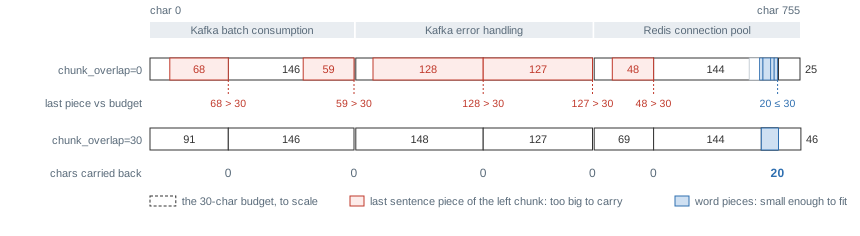
chunk_overlap=30 — identical everywhere except chunk 6, which grew from 25 to 46 characters by taking those 20.
Read that backwards and it is a genuinely useful rule: overlap materializes only where the separator pieces are smaller than the overlap budget. Long sentences — exactly the text where a fact is most likely to straddle a seam — are where overlap is least able to help you. If you want it to bite, the budget has to be commensurate with your sentences, not with your chunk size. And budget the index inflation the same way: not 30 × (chunks − 1) = 180 characters, but the 21 you actually got.
Overlap is a dial, not a switch. Too little and facts still get orphaned; too much and you inflate the index with near-duplicate chunks that crowd each other in the results. The advice you will see quoted is 10–20% of the chunk size, and 30 of 150 is exactly the 20% — which is worth noticing, because that textbook setting is the one that just came back empty at five seams out of six. It is a reasonable place to start a search, not a value that earns its keep by being in range. What tells you whether it is working is the seam-by-seam count above, on your own corpus — a number you can print in one line, and worth printing before you trust the setting.
28.3 Cutting on structure: Markdown headings
Counting characters — even politely, on sentence boundaries — throws away something a lot of real documentation already hands you for free: its structure. A Markdown doc, a wiki page, an API reference all carry headings that mark where one topic ends and the next begins. MarkdownHeaderTextSplitter cuts on those headings instead of on length, and it remembers the heading path each chunk came from. It also returns something different from the character splitters above: not strings but Chapter 27’s Documents, with the chunk’s text in page_content and that heading path in metadata — where, as before, a label is only a label until something embeds it or shows it to the model.
MARKDOWN_DOC = """# Message Queues
## Kafka
### Batch consumption
Set spring.kafka.listener.type=batch to enable it, then tune max-poll-records.
### Error handling
Use a DefaultErrorHandler with a dead-letter queue to isolate bad messages.
## RabbitMQ
### Acknowledgements
Manual ack keeps messages from being lost."""

splitter = MarkdownHeaderTextSplitter(headers_to_split_on=[
    ("#", "h1"), ("##", "h2"), ("###", "h3"),
])
docs = splitter.split_text(MARKDOWN_DOC)

for doc in docs:
    # the heading path: store it next to the vector, cite it as the answer's source
    path = " > ".join(doc.metadata.get(k, "") for k in ["h1", "h2", "h3"] if doc.metadata.get(k))
    print(f"[{path}]")
print(f" {doc.page_content.strip()}")===== B) markdown structural split - each chunk carries its heading path =====
[Message Queues > Kafka > Batch consumption]
Set spring.kafka.listener.type=batch to enable it, then tune max-poll-records.
[Message Queues > Kafka > Error handling]
Use a DefaultErrorHandler with a dead-letter queue to isolate bad messages.
[Message Queues > RabbitMQ > Acknowledgements]
Manual ack keeps messages from being lost.Six heading lines, three chunks. The splitter cuts at a heading only when text follows it, so # Message Queues and ## Kafka contribute to the path without producing chunks of their own — the three leaf sections are the three chunks, each cut where the author already decided one idea stops and the next starts. No character count could place those boundaries as well.
And every chunk now carries a breadcrumb: Message Queues > Kafka > Error handling. That path is worth as much as the text. Store it alongside the vector and you can filter retrieval by section and cite an answer’s source: “from Kafka > Error handling,” rather than “somewhere in the queues doc.” Structure that the corpus gives you for free is structure you should not throw away by counting characters over it.
What this splitter does not do is bound the size of what it emits. A section is one chunk however long the author made it, so on a real wiki you will often want both: split on headings first, then run a recursive splitter inside any section that came back too big — carrying the heading metadata down onto each piece. The structure gives you the boundary; the character count gives you the ceiling.
28.4 Does the cut change retrieval? bad vs good
The splits above look better on the page, but “looks readable” is not the claim that matters. The claim is that better chunks retrieve better. To settle it we build two Chroma indexes from the same document, with the embedding model from Chapter 27 and one fixed query, and change one thing: how the document was cut before it went in.
- The bad index stores the whole document as a single chunk — no splitting at all, the blob Ch25 shipped.
- The good index splits by paragraph, so each topic becomes its own chunk.
from langchain_chroma import Chroma
from langchain_openai import OpenAIEmbeddings

# nomic needs a task prefix on each side of retrieval — search_document: on indexed
# text, search_query: on the lookup (Chapter 25, RAG Foundations). NomicEmbeddings is that
# adapter, defined inline in the runnable file; the local server won't add them.
embeddings = NomicEmbeddings(
    base_url="http://localhost:1234/v1",   # your local server, not the OpenAI cloud
    api_key="lm-studio",                    # the local server ignores the key
    model="text-embedding-nomic-embed-text-v1.5",
    check_embedding_ctx_length=False,
    timeout=240,
)

# BAD: the whole document as one chunk
bad = Chroma(collection_name="bad", embedding_function=embeddings,
             collection_metadata={"hnsw:space": "cosine"})
bad.add_texts([SAMPLE], ids=["sample:0"], metadatas=[{"doc_id": "sample", "chunk": 0}])

# GOOD: one chunk per paragraph (chunk_size exceeds any single paragraph)
good_chunks = RecursiveCharacterTextSplitter(
    chunk_size=300, chunk_overlap=40,
    separators=["\n\n", "\n", ". ", " ", ""],   # keep the last two — see below
).split_text(SAMPLE)
good = Chroma(collection_name="good", embedding_function=embeddings,
              collection_metadata={"hnsw:space": "cosine"})
good.add_texts(good_chunks,
               ids=[f"sample:{i}" for i in range(len(good_chunks))],
               metadatas=[{"doc_id": "sample", "chunk": i} for i in range(len(good_chunks))])
The chunks go in as sample:0 … sample:6, each carrying its doc_id and its chunk number: a chunk’s identity is its document plus its place in it, the same two fields Chapter 27 gave whole documents, one level down. A retrieval that returns sample:3 can be traced to the paragraph it was cut from, and a re-chunking that produces seven pieces where there were six is a change the ids make visible instead of silent.
(In memory here, so the listing stays short; the companion gives each collection a persist_directory under a temporary folder, so a rerun starts from nothing rather than adding the same chunks twice.)
Now put the identical question to both. Chroma returns a cosine distance, so, as in Chapter 27, we read similarity as 1 - distance: higher is closer.
question = "How do I configure Kafka batch consumers?"

doc_bad, dist_bad = bad.similarity_search_with_score(question, k=1)[0]
doc_good, dist_good = good.similarity_search_with_score(question, k=1)[0]===== C) retrieval comparison - question: How do I configure Kafka batch consumers? =====
BAD index (whole doc as one chunk) - top hit, similarity 0.791:
Kafka batch consumption. To turn on batch consumption, set spring.kafka.listener.type=batch. Once enabled, the listener...
-> returns all 755 chars: batch consumption plus error handling plus Redis, diluting the answer.
GOOD index (split by topic) - top hit, similarity 0.801:
Kafka batch consumption. To turn on batch consumption, set spring.kafka.listener.type=batch. Once enabled, the listener method receives a List and pulls many messages in one poll. To bound each batch, tune the max-poll-records parameter.
-> returns only 237 chars, hitting the batch-consumption topic exactly.Both indexes find something — the batch-consumption text is in there either way. What each hands back differs. The bad index has only one thing to return: all 755 characters (the block shows the first 120 of them), batch consumption welded to error handling welded to the Redis pool. The question was about batch consumers; 518 of those 755 characters — a little under 70% — are about something else. That noise is not free. It nudges the match down a little (similarity 0.791 versus the good index’s 0.801, a margin thin enough that another embedder could close it), but the cost that does not depend on the margin is downstream: those 518 characters become context the generator has to read past to answer. The good index returns 237 characters that are all, and only, about the topic asked. The cut is the only thing that changed between the two indexes.
It is tempting to leave this chapter looking for the magic number — the chunk size that always works. There isn’t one, and reaching for one is the mistake. The failure is symmetric. Chunk too big and you get the bad index above: the right answer is in there, but drowned in unrelated text that dilutes the similarity score and floods the generator’s context. Chunk too small and you get the opposite failure — maximum idle connections. torn from the max-idle that named it — where a chunk is so fine it has lost the context that made it an answer at all.
The right size lives between those, and where between them depends on your corpus: dense API reference tolerates small chunks; narrative runbooks need larger ones to keep a procedure whole; a heading-rich wiki wants structural splitting over any character count. So do not hunt for a global constant. Pick a strategy that respects the document’s boundaries (recursive, or structural when you have headings), start around a few hundred characters with modest overlap, and then let real queries tell you where it is too coarse or too fine. Chunking is tuned, not looked up — and Chapter 32 is where we make “tuned” a number instead of a hunch.
28.5 Running it
The runnable file for this chapter, code/ch26_chunking.py, defines the sample document and runs all three parts in turn — the fixed-versus-recursive cuts, the Markdown structural split, and the bad-versus-good retrieval comparison:
if __name__ == "__main__":
    part_a()   # fixed vs recursive vs overlap
    part_b()   # markdown structural split + heading-path metadata
    part_c()   # bad vs good retrieval, against Chroma
Parts A and B are pure text splitting, no model and no network, so they print the same thing every run. Part C embeds against the local server, so the similarity numbers (0.791, 0.801) will drift a little with the embedding model (one representative run — Chapter 12). The 0.010 between them is small enough that a different embedder could reorder it; what the run does establish without depending on that margin is the other half — the good index returned 237 characters on the asked-for topic and the bad index returned all 755.
28.6 The operational rule
The cut happens before the embedding, so it bounds everything after it: a vector search can only return chunks you made. Later stages can compensate for a lot — rewriting the query, returning more chunks, reranking them — but they are all choosing among the pieces you cut. In practice that comes down to four decisions:
- Cut on boundaries. A fixed ruler turned
KafkaintoK+afkaand ran one chunk across the paragraph break;RecursiveCharacterTextSplitterwith paragraph, line, sentence, word as its separator order did neither. Give up uniform length to get that. - Overlap by 10–20% of the chunk size as a starting guess, then print what each seam actually received. Here 20% attached
and max-idle for thetomaximum idle connections.at one seam and did nothing at the other five, because overlap moves whole separator pieces and the budget has to be big enough to hold one. - When the corpus has headings, split on them and keep the heading path as metadata. It is both a better boundary and a citation.
- Start around a few hundred characters, then let real queries show where the chunks are too coarse (the 755-character blob at similarity 0.791) or too fine (a 25-character fragment). There is no constant to look up.
We have now made the stored side of retrieval good. But the query side is still whatever the user typed, and the top-k the store hands back is still whatever the vectors ranked — some of it noise. The next chapter, Query Rewrite & Reranking (Chapter 29), puts an LLM at both ends of retrieval: it rewrites a vague or misspelled question into something the index can actually match before the search, and it re-scores the raw top-k to push the relevant chunks up and drop the near-misses after it. Good chunks are the raw material; next we sharpen what goes in and what comes out.
New pieces in this chapter
| Piece | Usage |
|---|---|
| Type | |
CharacterTextSplitter |
Fixed-size splitter; with separator="" it cuts wherever the character count lands. CharacterTextSplitter(separator="", chunk_size=120, chunk_overlap=0); blind to words and topics |
RecursiveCharacterTextSplitter |
Boundary-respecting splitter; tries the biggest separator first, falls back to smaller. RecursiveCharacterTextSplitter(chunk_size=150, separators=["\n\n", "\n", ". ", " ", ""]); sizes vary — the right trade |
MarkdownHeaderTextSplitter |
Splits on Markdown headings and keeps each chunk’s heading path as metadata. MarkdownHeaderTextSplitter(headers_to_split_on=[("#", "h1"), …]); its split_text returns Documents, not strings |
| API | |
CharacterTextSplitter.split_text() |
Cut one string into a list of chunks; every splitter shares this method. fixed.split_text(SAMPLE); pure text-in, chunks-out — no model, no network, same output every run |
RecursiveCharacterTextSplitter(chunk_overlap=…) |
Keyword arg; a ceiling on the characters carried back at a seam, not a quota. chunk_overlap=30; the splitter carries whole separator pieces, so a seam whose pieces are all larger than the budget gets nothing — count what you actually got |
Code in this chapter
| File | What it runs |
|---|---|
code/ch26_chunking.py |
The cut that decides retrieval quality: fixed, recursive and structural splitters, measured against the same document. |
Challenge
Two dials to feel for yourself: the size of a chunk, and whether it respects structure.
🥉 Bronze — find where the size breaks
The good index used chunk_size=300, comfortably larger than any single paragraph, so each topic stayed whole. Push it to both extremes and watch retrieval bend. First set the good splitter’s chunk_size to something tiny — say 60 — and re-run the Part C comparison: the batch-consumption topic now spans several chunks, and the top hit is a fragment missing half its context. Then set chunk_size to 2000: the “good” split collapses back into a single blob and its result becomes indistinguishable from the bad index. Predict each outcome before you run it, then note why both extremes hurt — the same symmetric failure the Gotcha named.
Then look at the scores rather than the text, and predict those too. At 60 the top hit is a fragment you could not answer from; does its similarity fall to match? Whatever you find, say what it means for the one consumer you have already met: the 0.60 similarity filter from Chapter 27, which sees nothing but that number. Be careful how far you push the conclusion — the later stages in this part do not all read the same signal. Section 29.2 hands the candidate’s text to a model and scores it afresh; Section 31.3 matches the question and checks freshness before it trusts anything. A fragment that slips past a similarity threshold has not thereby slipped past those.
 Worked solution with tests:
 code/answers/ch26_find_where_the_size_breaks.py.
🥈 Silver — chunk by structure, retrieve with the breadcrumb
Part B produced structural chunks with a heading path, and Part C fed retrieval with plain paragraph chunks — join the two. Take the MARKDOWN_DOC, split it with MarkdownHeaderTextSplitter, and for each chunk prepend its heading path to the text before indexing (so Kafka > Error handling becomes part of what gets embedded), while also stashing the path in Chroma’s per-document metadata. Then query “how do I stop a bad message from failing the whole batch?” and show two things: the returned chunk is the error-handling one — not batch consumption, and not RabbitMQ acknowledgements, which is the other document in MARKDOWN_DOC that is also about not losing messages — and you can print its heading path from metadata as the answer’s source. A good chunk can carry where it came from, and that breadcrumb is the difference between “here is an answer” and “here is an answer, from Kafka > Error handling.”
Worked solution with tests: code/answers/ch26_structural_retrieval.py. It runs offline — the embedder is a deterministic stand-in, so the ranking is stable byte for byte. Point it at the chapter’s NomicEmbeddings to run it for real.